

Computer Science Concept Notes for Class 7: Typing Tutor
Access comprehensive revision notes for Typing Tutor using the CBSE Class 7 Computer Science Typing Tutor Notes. Designed to align with the 2026-27 academic syllabus for Class 7 Computer Science, these concept summaries help students streamline their exam preparation and review complex topics efficiently.
Download Typing Tutor Revision Notes PDF
Navigate directly to the revision notes for Typing Tutor using the digital viewer below. Each summary is structured to highlight high-weightage sections, allowing students to instantly access critical definitions and focus on core exam topics.
Fill in the blanks:
Question: To use number pad, _______________ should be kept ON
(a) Num lock
(b) Caps Lock
(c) scroll lock
(d) none of these
Answer: Num lock
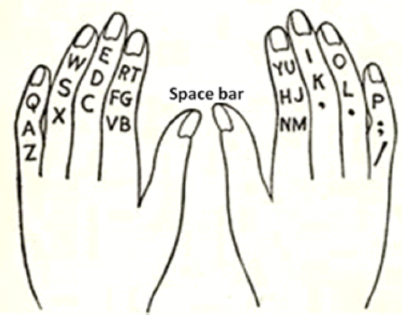
Question: In home row, _ key is pressed with little finger of left hand.
(a) A
(b) S
(c) D
(d) F
Answer: A
Question: In home row, _ key is pressed with Middle finger of right hand.
(a) J
(b) K
(c) L
(d) ;
Answer: k
Question: In Second row, _ key is pressed with ring finger of left hand.
(a) Q
(b) W
(c) E
(d) R
Answer: W
Question: In third row, _ key is pressed with index finger of right hand.
(a) B
(b) N
(c) M
(d) N, M
Answer: N,M
Write True/False
Question: For typing, the keyboard is divided in two parts: one for the left hand and one for the right.
Answer: True
Question: Touch typing is a technique by which we can learn typing with all fingers without looking at keyboard.
Answer: True
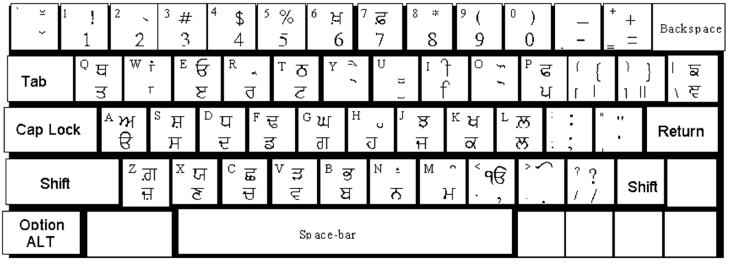
Question: Anmol lipi font helps us typing in Punjabi.
Answer: True
Question: We use our thumb of right hande to press the spacebar.
Answer: True
Question: Enter key is used to move down to a new line.
Answer: True
Short Answer type Questions
Question: What is Touch typing?
Answer: Touch typing is a technique by which we can learn typing with all fingers without looking at keyboard.
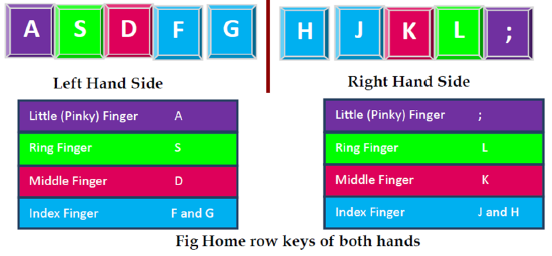
Question: Describe the position of our fingers on Home Row Key?
Answer:
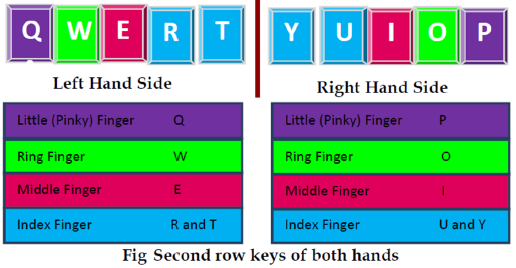
Question: Describe keys in Second Row of Keyboard?
Answer:
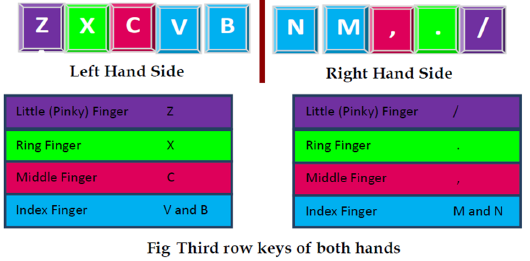
Question: Describe the position of your fingers on Third Row Key?
Answer:
Question: While typing numbers form numeric key pad, which hand we should use? Explain the position of your fingers on numeric key pad.
Answer: While typing numbers form numeric key pad, we should use RIGHT Hand. We should
place our fingers on numeric key pad as follows:
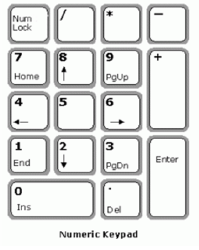
- Right hand thumb on 0
- First finger of right hand on 4
- Second finger of right hand on 5
- Fourth finger of right hand on 6
Long Answer type Questions:
Question: Draw Anmol Lipi Key Map.
Question: How can we improve typing speed?
Answer: To improve typing speed, we should take care of the following instructions:
1. Our hand/finger position should always be in home position.
2. We should reach for other keys from home position.
3. We should focus on accuracy not speed.
4. Don’t look at the keyboard while typing.
5. Be steady, even pace and strive for accuracy.
Question: Explain the Proper Posture while typing?
Answer: While typing we must know about the proper posture. So follow the steps written below:
1. We should sit up straight, directly in front of keyboard.
2. Our feet must be flat on floor.
3. Monitor should be at our eye level.
4. Our eyes should be on copy or monitor.
5. Our fingers must be curved and upright over home keys.
6. We should strike each key with a quick snap and then return to home position Keys.
For students to remember for typing:
Revision Notes and Key Concepts for Class 7 Computer Science Typing Tutor
Download Chapter Summary: Class 7 Computer Science Typing Tutor
Review targeted chapter notes for Class 7 Computer Science Typing Tutor . Built according to official CBSE guidelines, these summaries highlight high-yield topics frequently tested in school evaluations.
Concept Clarification for Typing Tutor
Each chapter summary is structured around standard CBSE textbooks, allowing students to check their understanding and clarify complex ideas early in their revision.
Additional Study Resources for Class 7 Computer Science
Follow up your revision by attempting the interactive online Computer Science MCQ test and practice worksheets for this chapter to verify your mastery. All platform resources are free to access.
FAQs
You can download the teacher prepared revision notes for CBSE Class 7 Computer Science Typing Tutor Notes from StudiesToday.com. These notes are designed as per 2026-27 academic session to help Class 7 students get the best study material for Computer Science.
Yes, our CBSE Class 7 Computer Science Typing Tutor Notes include 50% competency-based questions with focus on core logic, keyword definitions, and the practical application of Computer Science principles which is important for getting more marks in 2026 CBSE exams.
Yes, our CBSE Class 7 Computer Science Typing Tutor Notes provide a detailed, topic wise breakdown of the chapter. Fundamental definitions, complex numerical formulas and all topics of CBSE syllabus in Class 7 is covered.
These notes for Computer Science are organized into bullet points and easy-to-read charts. By using CBSE Class 7 Computer Science Typing Tutor Notes, Class 7 students fast revise formulas, key definitions before the exams.
No, all study resources on StudiesToday, including CBSE Class 7 Computer Science Typing Tutor Notes, are available for immediate free download. Class 7 Computer Science study material is available in PDF and can be downloaded on mobile.