

Download CBSE Class 3 Computers Assignments
Review targeted academic assignments with the CBSE Class 3 Computers Assignment Set 01. Built according to official CBSE standards for the 2026-27 term, these downloadable Class 3 Computers worksheets support effective daily practice for All topics.
Access CBSE School Assignments and Answers
Access the complete assignment PDF for Class 3 Computers below. Regular practice with these targeted academic tasks builds familiarity with standard question patterns and helps secure higher marks in final school evaluations.
Q1.Do as directed:
a. Insert an arrow of your choice from the Block Arrows submenu in Auto shapes.
b. Apply a 3-D effect of your choice to the arrow.
c. Now, apply the following effects to the 3-D object as given below:
i. Tilt up
ii. Tilt right
iii. Increase depth
iv. Change colour
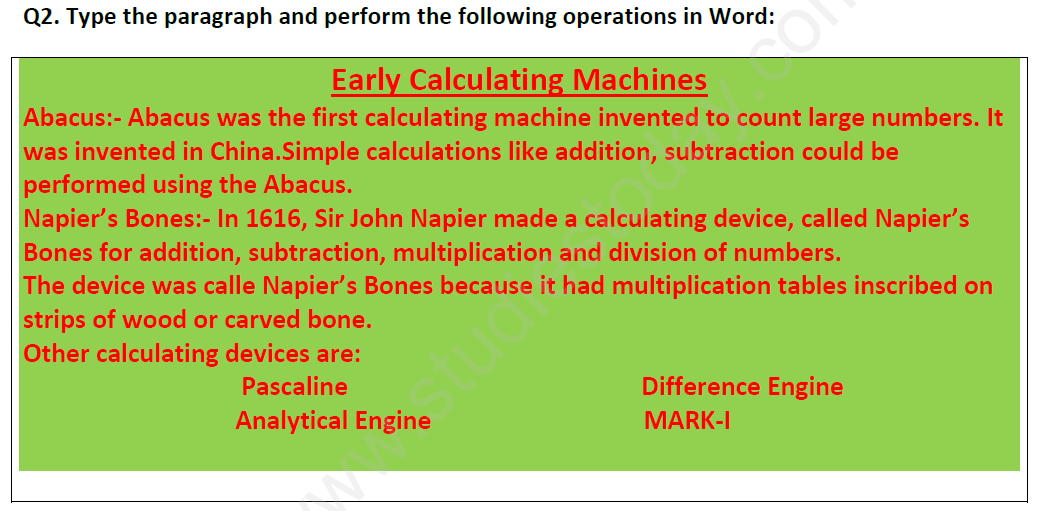
1. Apply bullets or numbers for other calculating devices.
2. Apply green as background for the table and text colour as red.
Q3. Fill in the blanks: (Basics of Computer):
i. VDU stands for ………………………………
ii. ………………………. Is a pointing device used for playing games.
iii. A …………………… is used to play sound and music in computer.
iv. A ………………….. is used to input voice in computer.
v. A …………….. is used to input voice in computer.
A. Check the Right Answer
Question. Name the device that lets you type information into the computer.
a. Mouse
b. CPU
c. Keyboard
d. Monitor
Answer: Keyboard
Question. How many buttons are there on a mouse?
a. 1
b. 2
c. 4
d. 5
Answer: 2
Question. Which device processes the information that we feed into a computer?
a. Monitor
b. Hard Disk
c. CPU
d. Keyboard
Answer: CPU
Question. Name the term used for entering data and instructions in a computer.
a. Inout
b. Input
c. Output
d. Processing
Answer: Input
Question. What are the main functions of a computer?
a. IOP
b. OPI
c. IPO
d. All of these
Answer: IPO
B. Fill in the blanks :
Question. A computer never gets ……………
Answer: TIRED
Question. A computer in a shop is used for keeping ………… of all items.
Answer: RECORDS
Question. ………… monitor consumes less power.
Answer: LCD
Question. Computers are used in Railways for ……………………
Answer: TICKET RESERVATION
Question. A computer is a ……….... that works with data and instructions.
Answer: MACHINE
C. State True (T) or False ( F)
Question. We cannot draw pictures on a computer.
Answer: FALSE
Question. Man can work for long hours without getting tired.
Answer: FALSE
Question. Computers are used in schools for online reservation and ticket printing.
Answer: FALSE
Question. Computers cannot be used in banks for keeping records of money.
Answer: FALSE
Question. We cannot play music on a computer.
Answer: FALSE
1-Write full form of :----
a- LED b- IQ c- MU d- HD e- CD
2-Fill in the blanks:-----
a- Devices that are used to input data and instructions into the computer are known as__________________.
b- A printer is used to _________ any document or picture on a sheet of Paper.
c- The physical components or parts of a computer that you can see or Touch / feel are known as _____________.
d- A set of instructions given to a computer is called __________.
e- The ______________ manages the overall working of a computer.
3- Unscramble the given words:----
a- AERTFSOW c- OMERYM
b- TIANP d- LTORNCO
4-Who am I:-----
a- I am a part of the system that makes a computer run.
b- I am a device that is used for playing games.
c- I am a part of a computer that cannot be touched and seen.
d- I give output on paper.
5- Write true or false:--
a- A computer has four main parts.
b- A computer has two basic parts.
c- A scanner is an output device.
Download Practice Assignments: Class 3 Computers All topics
Revision Assignment: All topics (CBSE)
Explore reliable practice questions for All topics tailored for Class 3 learners. Use these structured worksheets to evaluate preparedness and strengthen core problem-solving skills.
Why Practice Class 3 Computers Assignments?
- Curriculum Standards: Assignments match modern CBSE sample formats to ensure relevant preparation.
- Thorough Revision: Detailed problem sets reinforce core concepts and eliminate conceptual weak spots.
- Execution Speed: Timed practice with assignment sets sharpens overall response timing.
Effective Strategy for Class 3 Computers Assignments
- Textbook Review: Always study the core NCERT book for Class 3 Computers prior to beginning the assignment.
- Independent Attempt: Solve All topics questions on your own initially before cross-checking with expert solutions.
- Error Tracking: Record challenging concepts in a dedicated notebook and practice online MCQ tests for revision.
FAQs
You can download free PDF assignments for Class 3 Computers All topics from StudiesToday.com. These practice sheets have been updated for the 2026-27 session covering all concepts from latest NCERT textbook.
Yes, our teachers have given solutions for all questions in the Class 3 Computers All topics assignments. This will help you to understand step-by-step methodology to get full marks in school tests and exams.
Yes. These assignments are designed as per the latest CBSE syllabus for 2026. We have included huge variety of question formats such as MCQs, Case-study based questions and important diagram-based problems found in All topics.
Practicing topicw wise assignments will help Class 3 students understand every sub-topic of All topics. Daily practice will improve speed, accuracy and answering competency-based questions.
Yes, all printable assignments for Class 3 Computers All topics are available for free download in mobile-friendly PDF format.