

Computers Objective Questions and Answers: Windows 7
Review structured MCQ sets for Class 4 Computers Windows 7. Built according to official CBSE guidelines, these downloadable questions support daily revision and core concept reinforcement.
Download Windows 7 MCQs with Answers
View or download the dedicated Windows 7 MCQ resource below. Practicing these 50 objective questions regularly builds familiarity with standard exam patterns and helps secure higher marks in final Computers evaluations.
Question. Which of the following options is CORRECT to display the given snapshot in Windows 7?
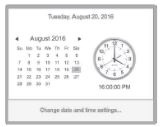
(a) Single left click on Date-and-Time button in Notification area of the Taskbar
(b) Go to Accessories → Date-and-Time
(c) Go to Control Panel → Accessories → Date-and-Time
(d) Right click on Show Desktop button of Notification area of the Taskbar
Answer: A
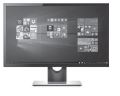
Question. Identify the given icon present in Control Panel of Windows 7
(a) Internet Options
(b) Desktop Gadgets
(c) Devices and Printers
(d) Firewall
Answer: B
Question. Arrange the given steps in CORRECT order of sequence, if you want to change the appearance of your display on your computer in Windows 7.
1. Display
2. Change display settings
3. Control Panel
(a) 3 → 1 → 2
(b) 1 → 3 → 2
(c) 3 → 2 → 1
(d) 2 → 3 → 1
Answer: A
Question. Which of the following features of Windows 7 will you use when your desktop is cluttered up with opened windows and want to select a single window?
(a) Aero Peek
(b) Aero Snap
(c) Aero Shake
(d) Aero Flip
Answer: C
Question. _________is used to remove a text or file.
(a) Copy
(b) Paste
(c) Edit
(d) Delete
Answer: D
Question. You cannot resize the taskbar in Windows 7, if __________.
(a) It is locked
(b) It is positioned on the top of desktop screen
(c) Some applications are pinned to it
(d) None of these
Answer: A
Question. You want to change the number of lines to be scrolled when you move the wheel on your computer’s mouse. Which of the following will you use to change the settings?
(a) Control Panel
(b) Computer
(c) Windows Explorer
(d) Devices and Printers
Answer: D
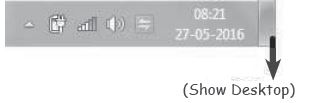
Question. Which of the following features of Windows 7 is displayed in the given image?
(a) Thumbnail Preview
(b) Aero Snap
(c) Aero Peek
(d) Aero Shake
Answer: C
Question. The deleted files or folders are placed in
(a) My document
(b) Desktop
(c) Recycle bin
(d) My computer
Answer: C
Question. Which one makes the computer to close safely in windows 7?
(a) Shutdown
(b) Log off
(c) Search
(d) Lock
Answer: A
Question. Which of the following marked areas of Windows Explorer allows you to navigate the recently visited folders or libraries in Windows 7?
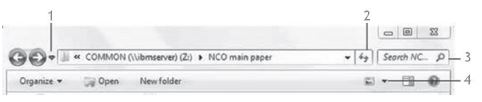
(a) 1
(b) 2
(c) 3
(d) 4
Answer: A
Question. Which of the following statements is CORRECT about Icon-1 and Icon-2 with respect to Windows 7?
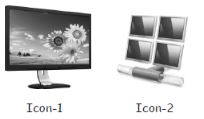
(a) Icon-1 displays desktop backgrounds and Icon-2 displays local drives.
(b) Icon-1 displays options for screen brightness and resolutions and Icon-2 is used for changing the system time.
(c) Icon-1 displays various desktop gadgets available in the system and Icon-2 shows the list of computers and other devices available on the network.
(d) Icon-1 displays the options to change taskbar appearance and Icon- 2 displays the options to change the appearance of Start menu.
Answer: C
Question. Which one of the following displays all the application software installed in the computer?
(b) My document
(a) Programs
(c) Desktop
(d) Start
Answer: B
Question. Which of the following shortcut keys is used to maximize the restored window in Windows 7?

Answer: B
Question. __________ view displays the files and folders as icons.
(a) Thumbnails
(b) Icons
(c) List
(d) Tiles
Answer: D
Download Chapter MCQs: Class 4 Computers Windows 7
Chapter MCQs with Answers for Class 4 Computers
Test your conceptual understanding of Windows 7 with these targeted multiple-choice questions. Designed in alignment with the latest CBSE curriculum for Class 4 Computers, these problem sets build accuracy and prepare students for objective exams.
Expert Practice Material for Class 4 Computers
Each question includes structured solution keys mapped directly to standard CBSE textbooks, helping students evaluate their reasoning and correct mistakes early in their revision.
Complete Your Chapter Revision
Follow up your worksheet practice by attempting the interactive online Computers MCQ test for this chapter to evaluate your execution speed. All platform resources are free to access.
FAQs
You can get most exhaustive CBSE Class 4 Computer Studies Windows 7 MCQs for free on StudiesToday.com. These MCQs for Class 4 Computers are updated for the 2026-27 academic session as per CBSE examination standards.
Yes, our CBSE Class 4 Computer Studies Windows 7 MCQs include the latest type of questions, such as Assertion-Reasoning and Case-based MCQs. 50% of the CBSE paper is now competency-based.
By solving our CBSE Class 4 Computer Studies Windows 7 MCQs, Class 4 students can improve their accuracy and speed which is important as objective questions provide a chance to secure 100% marks in the Computers.
Yes, Computers MCQs for Class 4 have answer key and brief explanations to help students understand logic behind the correct option as its important for 2026 competency-focused CBSE exams.
Yes, you can also access online interactive tests for CBSE Class 4 Computer Studies Windows 7 MCQs on StudiesToday.com as they provide instant answers and score to help you track your progress in Computers.