

Multiple Choice Questions (MCQs) for Class 4 Computers: MS Paint
Explore reliable objective questions for MS Paint tailored for Class 4 learners. Utilizing these Computers multiple-choice formats ensures thorough preparation and strengthens problem-solving speed for upcoming school assessments.
Practice MS Paint MCQs for Class 4 Computers
Access the complete set of multiple-choice questions for MS Paint below. This focused format allows students to isolate specific topics for thorough review and uninterrupted practice alongside official CBSE textbooks.
Question: What does the open tool do?
(a) View a slide show of your paintings.
(B) Open a particular painting
(c) Deleting a painting
(d) Edit a painting
Answer: b
Question: A line of text is given here. Which of the following options is used to make it look like as the text shown in Image-1?

Answer: a
Question: If we save an image in ______ format in MS-Paint of Windows 7, then it is of high quality and can be used on the computer or on the web.
(a) GIF
(b) DOC
(c) PNG
(d) All of the options
Answer: c
Question: A drawing is made by you in MS-Paint of Windows 7. What steps should be followed if you want to fill the entire desktop screen with this drawing?

Answer: d
Question: Which of the following is used to save the file in MS-Paint of Windows 7?

Answer: d
Question: Which tool is used to draw rectangle, square, and circle?
(a) Line tool
(b) Shape tool
(c) Brush tool
(D) Paint tool
Answer: b
Question: Which of the following tools is not used for creating the given drawing in MS-Paint of Windows 7?
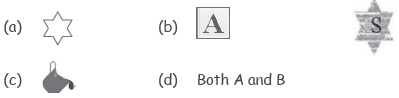
Answer: c
Question: Which palette shows the bottom of the screen?
(a) Toolbar
(b) Selector
(c) Colors
(d) Edit
Answer: c
Question: Which of the following options does not occur in the Home tab in MS-Paint of Windows 7?

Answer: b
Question:
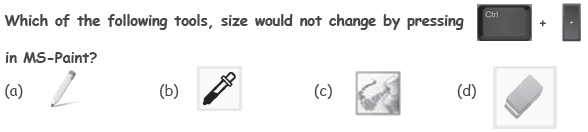
Answer: b
Question: Which type of free software is Tux Paint?
(a) Microsoft
(b) Copyright
(c) Open Source
(d) Close Source
Answer: c
Question: In MS-Paint of Windows 7, Calligraphy 1, Air, Oil, and Natural Pencil, etc. are all types of _____.
(a) Shapes
(b) Brushes
(c) Fill Styles
(d) Outline Styles
Answer: b
Question: Which tool is used to draw straight lines?
(a) Brush tool
(b) Shape tool
(c) Line tool
(d) Paint tool
Answer: c
Question: Which of the following properties when enabled (after selecting Text tool) will cause the text being typed to have yellow background and red font color as shown in the given snapshot of MS-Paint?
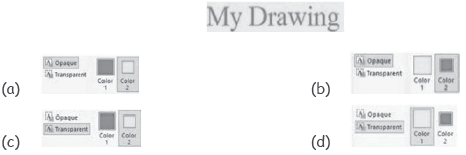
Answer: a
Question: You have drawn the fish as shown in the image using the Pencil tool in MS-Paint of Windows 7. Which of the following is the best tool to color the fish?
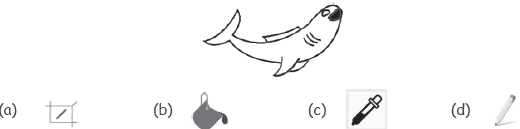
Answer: b
Question: Which of the following operations is performed on Image-1 to convert it into Image-2 and then from Image-2 into Image-3 in MS-Paint?
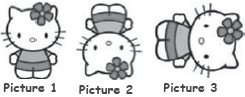
(a) Flip vertical, Rotate left 90°
(b) Flip horizontal, Rotate left 90°
(c) Rotate left 90°, Rotate left 90°
(d) Rotate left 90°, Flip vertical
Answer: a
Question: Which of the following Background options in MS-Paint of Windows 7 is selected in the given text?
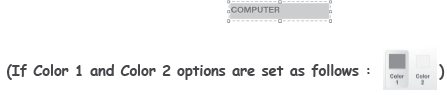
(a) Transparent
(b) Opaque
(c) Arial
(d) Skew
Answer: b
Question: Identify the function of the given icon of MS-Paint.

(a) It changes border around the page.
(b) It inserts picture behind the text in your document.
(c) It colors the background of the page.
(d) It inserts ghosted text behind the content of the page.
Answer: c
Question: Which tool is used to add text?
(a) Text tool
(b) Shape tool
(c) Brush tool
(d) Paint tool
Answer: a
Question: Which of the following statements hold(s) true about the icon marked as X in given screenshot of MS-Paint?
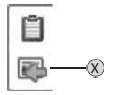
Statement 1 : It lets you insert existing images in your system.
Statement 2 : The name of this icon is “Insert Picture”. X
(a) Only Statement 1
(b) Only Statement 2
(c) Both Statement 1 and Statement 2
(d) Neither Statement 1 nor Statement 2
Answer: a
Question: Match the following MS-Paint tools of Windows 7.
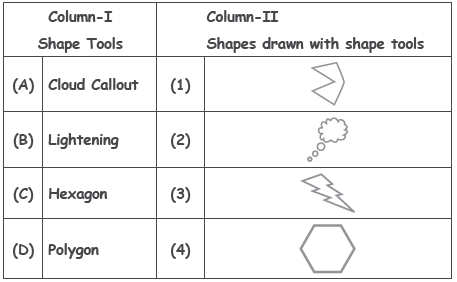
(a) (A) – (2), (B) – (3), (C) – (4), (D) – (1)
(b) (A) – (2), (B) – (3), (C) – (1), (D) – (4)
(c) (A) – (3), (B) – (2), (C) – (1), (D) – (4)
(d) (A) – (3), (B) – (2), (C) – (4), (D) – (1)
Answer: a
Question: Match the image with the fill style used to create the image in MS-Paint of Windows 7.
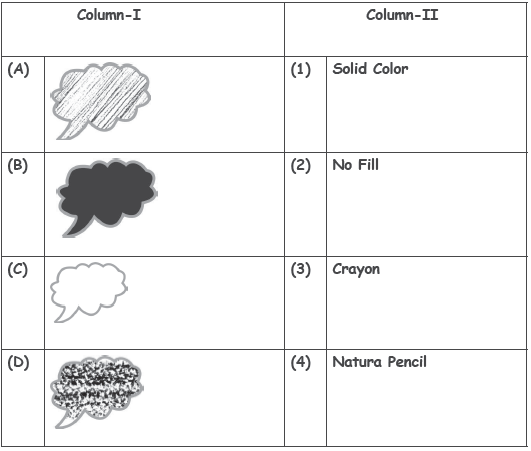
(a) (A)–(1), (B)–(4), (C)–(2), (D)–(3)
(b) (A)–(4), (B)–(1), (C)–(2), (D)–(3)
(c) (A)–(4), (B)–(3), (C)–(2), (D)–(1)
(d) (A)–(4), (B)–(2), (C)–(1), (D)–(3)
Answer: b
Multiple Choice Questions (MCQs) for Class 4 Computers MS Paint
About MS Paint MCQs for Class 4 Computers
Test your conceptual understanding of MS Paint with these targeted multiple-choice questions. Designed in alignment with the latest CBSE curriculum for Class 4 Computers, these problem sets build accuracy and prepare students for objective exams.
How to Verify Your MCQ Answers
Built using the official NCERT book for Class 4, these Computers objective sets provide reliable academic guidance. Pair your practice with our recommended NCERT solutions to master optimal problem-solving approaches.
Enhance Speed with Online MCQ Tests
Follow up your worksheet practice by attempting the interactive online Computers MCQ test for this chapter to evaluate your execution speed. All platform resources are free to access.
FAQs
You can get most exhaustive CBSE Class 4 Computer Studies MS Paint MCQs for free on StudiesToday.com. These MCQs for Class 4 Computers are updated for the 2026-27 academic session as per CBSE examination standards.
Yes, our CBSE Class 4 Computer Studies MS Paint MCQs include the latest type of questions, such as Assertion-Reasoning and Case-based MCQs. 50% of the CBSE paper is now competency-based.
By solving our CBSE Class 4 Computer Studies MS Paint MCQs, Class 4 students can improve their accuracy and speed which is important as objective questions provide a chance to secure 100% marks in the Computers.
Yes, Computers MCQs for Class 4 have answer key and brief explanations to help students understand logic behind the correct option as its important for 2026 competency-focused CBSE exams.
Yes, you can also access online interactive tests for CBSE Class 4 Computer Studies MS Paint MCQs on StudiesToday.com as they provide instant answers and score to help you track your progress in Computers.