

Class 8 Computer Science Solved Model Papers: CBSE Class 8 Computer Science Sample Paper Set 16
Access comprehensive sample question papers for Class 8 Computer Science using the CBSE Class 8 Computer Science Sample Paper Set 16. Designed to align with the 2026-27 CBSE academic guidelines, these model papers help students assess their exam readiness and understand current marking schemes.
Download Class 8 Computer Science Sample Paper PDF
Navigate directly to the solved Computer Science model papers using the digital viewer below. Each practice set includes detailed solutions, allowing students to instantly cross-check their work and identify areas requiring further revision.
CBSE Class 8 Computer Science Sample Paper Set P.Sample Papers are the very important for every student. The sample papers should be practiced to gain extra marks in examinations. The sample papers have been prepared based on summative assessment1 and summative assessment 2 pattern. The sample papers have been prepared based on pattern of last year examinations and as per latest changes in the syllabus. Students, teachers and parents can download all CBSE educational material and very well prepared worksheets from this website. All CBSE educational material is developed by our panel of teachers, have also been submitted by CBSE teachers and students.
Q-1 Fill in the blanks:
1. _____ menu contain standard options like cut, copy, paste, find etc.
2. _____ is shortcut to open properties window.
3. In visual basic the basic building block of an application is a _____.
4. Execution time is also known as ______.
5. We write code for an object in ____________ window.
6. _____ control is used to display text that you don’t want the user to change.
7. _____ property defines the name of a control.
8. If _____ property is set to false the control will be hidden.
9. ____ is the value for center alignment of text in a control.
10. _____ property displays the text as bold.
Q-2 State true or false:
1. Forecolor property sets background color of a control.
2. You can not enter value in textbox if enable property is set to true.
3. Controls are present in toolbox.
4. Caption of command button is text we see on the command button.
5. Style property is set to zero to apply background to command button.
6. Visual Basic is popular Macromedia programming language.
7. frm is file extension of visual basic form.
8. Horizontal spacing of controls is in Edit menu.
9. In full module view you see just procedure you are working in.
10. Start icon is present in standard toolbar.
Q-3 Write the code for the output given below”
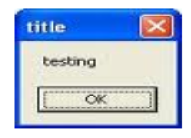
Q-4 What are the two possible values of enabled property and differentiate them?
Q-5 What will be the output of the following code: 2
Private sub command1_click()
Text1.text=”BAL BHARATI PUBLIC SCHOOL PITAMPURA”
Text1.passwordchar=”%”
End Sub
Q-6 Define the following: 2x2=4
1) Project Explorer Window.
2) Multiline property.
Q-7 Find the error in the following codes: 5x2=10
a) Public Sup Command1=Clicked[]
“bbps”=label1.caption
Label1.back:vb2
End
b) Pvt COMMAND!-dblclick
messagebox “best of luck”
visible.text1=true
text1=”Do Well in your exams”
cmd1.capital=”VB EXAM”
Sup
Q-8 Write a program in VB for the following: (Do any three) 5x3=15
1) On click of command button1 change the background color of command button2 to yellow and background of command button3 to nationalflag.jpg.
2) On click of command button hide textbox1 and disable textbox2.
3) Accept two values in two text boxes then show the product in a label box.
4) On click of a button set the tooltip of a command button to “COMPUTER”.
Please click the below link to access CBSE Class 8 Computer Science Sample Paper Set P.
CBSE Class 8 Computer Science Sample Paper Set 16 & Sample Question Papers for Class 8 Computer Science
Get Started with CBSE Class 8 Computer Science Sample Paper Set 16 (CBSE)
Explore downloadable sample sets for Class 8 Computer Science. Utilizing the CBSE Class 8 Computer Science Sample Paper Set 16 allows learners to gauge exam readiness and master official CBSE assessment structures.
Maximize Your Scores with Model Papers
- Exam Blueprint: Understand mark allocations and structural guidelines relevant to Class 8 evaluations.
- Targeted Improvement: Identify weak areas in Class 8 Computer Science requiring focused revision.
- Pacing & Precision: Practice mixed question formats to build execution speed and ensure timely paper completion.
How to Analyze Your Performance in CBSE Class 8 Computer Science Sample Paper Set 16
- Review Solutions: Evaluate your completed papers using expert-verified guidance inside our solution sets.
- Target Weaknesses: Class 8 students should analyze missed questions to rectify conceptual misunderstandings.
- Deep Revision: Re-read sections in the NCERT book for Class 8 Computer Science to clear doubts before solving items again.
FAQs
You can download the complete PDF for CBSE Class 8 Computer Science Sample Paper Set 16 for free from StudiesToday.com. Our resources for Class 8 Computer Science are updated for the latest academic session and follow the official exam pattern.
Yes, CBSE Class 8 Computer Science Sample Paper Set 16 comes with detailed, teacher-verified solutions. We have provided step-by-step answers for Computer Science to help students of Class 8 understand correct methodology and marking scheme.
Practicing this Computer Science paper helps in time management and identifying important topics. For Class 8, solving mock papers is the best way to gain confidence and reduce exam-day anxiety.
Yes, all our study materials for Class 8 Computer Science are provided in a mobile-friendly PDF format. You can easily download CBSE Class 8 Computer Science Sample Paper Set 16 on your mobile device.