

Download Class 10 Computers Practice Worksheets
Access comprehensive chapter-wise worksheets for Links and CSS in HTML using the CBSE Class 10 Computer Science Links and CSS in HTML Worksheet. Designed to align with the 2026-27 academic syllabus for Class 10 Computers, these printable practice sets help students reinforce key concepts and improve their overall exam readiness.
Access Links and CSS in HTML Practice Papers and Solutions
View or download the dedicated CBSE Class 10 Computer Science Links and CSS in HTML Worksheet resource below. Engaging with these practice papers under focused study conditions ensures continuous academic progress and mastery of the 2026-27 curriculum for Links and CSS in HTML.
Worksheets have become an integral part of the education system. Worksheets are very critical for every student to practice his/ her concepts. Students, teachers and parents can download all CBSE educational material and extremely well prepared worksheets from this website. All revision worksheets, Sample papers, Question banks and easy to learn study notes for all classes and subjects have been prepared based on the latest guidelines sent by CBSE. All CBSE educational material is developed by our panel of teachers, have also been submitted by thousands of teachers and students. The study material has been carefully compiled by the best teachers in India. Worksheets have been submitted by teachers of various CBSE schools and also have been carefully developed keeping into consideration the latest CBSE syllabus.
Multiple Choice Questions
Question. Which of the following is used to send E-mails through a website?
(a) tomail
(b)mailto
(c) Both (a) and (b)
(d)None of these
Answer. B
Question. Choose the correct syntax to create an E-mail link.
(a) <A href = "abc@xyz.com">
(b) <A href = "mailto:abc@xyz.com">
(c) <mail = "abc@xyz.com">
(d) <A mail = "abc@xyz.com">
Answer. B
Question. Which attribute of <AUDIO> element is used to give the URL of the audio to embed?
(a) controls
(b) type
(c) src
(d) loop
Answer. C
Question. Which of the following is not the attribute of <A> tag?
(a) name
(b) title
(c) href
(d) src
Answer. D
Question. The tag used in HTML to link a web page with other web page is
(a) <A>
(b) <H>
(c) <U>
(d) <L>
Answer. A
Question. Which tag tells, where a link starts?
(a) <L>
(b)<START>
(c) <A>
(d) None of these
Answer. C
Question. Which command should be used to link a page with HTML page?
(a) <A link = "page.htm"></A>
(b) <A href = "page.htm">page</A>
(c) <A connect = "page.htm"></A>
(d) <A attach = "page.htm"></A>
Answer. B
Question. With which code, you can make an image works as hyperlink?
(a) <A href = "URL">Text</A>
(b) <A href="ABC.html"><IMG src = "graphic.gif">Click Here</A>
(c) <A ref=mailto:<IMG src ="graphic.gif">Click Here</A>
(d) None of the above
Answer. B
Question. To create a hyperlinked image,
(a) the <IMG> tag should be within <A> tag
(b) the <A> tag should be within <IMG> tag
(c) the <IMG> tag should be before the <A> tag
(d) the <IMG> tag should be after the <A> tag
Answer. A
Question. Is it possible to link within the current page?
(a) No
(b) Only in framesets
(c) Yes
(d) Cannot say
Answer. C
Question. .....…….... is the default color of a hyperlink.
(a) Red
(b) Blue
(c) Green
(d) Black
Answer. B
Question. In which of the following, selector hash (#) character is used?
(a) id
(b) class
(c) Both (a) and (b)
(d) None of these
Answer. A
Question. With an ……… you can change the look of the entire website.
(a) external style sheet
(b) internal style sheet
(c) inline style
(d) None of these
Answer. A
Question. Symbol used in href for linking to the section in the same document.
(a) #
(b) @
(c) ?
(d) None of these
Answer. A
Question. The float property of a CSS defines the
(a) content
(b) text
(c) flow of content
(d) None of these
Answer. C
Question. …………… property of CSS specifies the horizontal alignment of text in an element.
(a) float
(b) width
(c) text-align
(d) padding
Answer. C
Question. ………… uses the id attribute of an HTML element to select a specific element.
(a) class selector
(b) id selector
(c) Both (a) and (b)
(d) None of these
Answer. B
Question. For internal linking, section names are provided by........... attribute of <A> tag.
(a) title
(b) href
(c) name
(d) None of these
Answer. C
Case Based MCQs
1.Rahul is an expert of web page designing. He is mostly used CSS to design web pages, from which he saves his time. His younger brother Sonu does not understand the logic for saving time and space, then Rahul help him to know the importance of CSS.
CSS is designed primarily to enable the separation of document content from document presentation, including aspects such as the layout, colors and fonts. This separation can improve content accessibility, provide more flexibility and control in the specification of presentation characteristics, enable multiple HTML pages to share formatting by specifying the relevant CSS in a separate .css file, and reduce complexity and repetition in the structural content such as semantically insignificance tables that were widely used to format pages before consistent CSS rendering was available in all major browsers.
Question. The full form of CSS is
(a) Cascading Style Sheet
(b) Cascading Sheet Style
(c) Cascade Style Sheet
(d) Cascadation Style Sheet
Answer. A
Question. CSS rule set consists of
(a) selector
(b) declaration
(c) Both (a) and (b)
(d) None of these
Answer. C
Question. ....... points to the HTML element that you want to style.
(a) Selector
(b) Declaration
(c) ID
(d) None of these
Answer. A
Question. A CSS declaration always ends with a
(a) dot
(b) colon
(c) semicolon
(d) hash
Answer. C
Question. Which of the following is/are property value of CSS?
(a) Color
(b)Margin
(c) Height
(d) All of these
Answer. D
Short Answer Type Questions
Question. Write the HTML code to create a link for school.jpg located at C:\.
Answer. <HTML>
<BODY>
<A href = "C:\school.jpg">Image</A>
</BODY>
</HTML>
Question. Name the attributes of <A> tag which are used for internal linking in a web page.
Answer. The attributes of <A> tag which are used for internal linking in a web page as follows
(i) href is used to specify the URL of the segment the link goes to.
(ii) name gives the name to the segment.
Question. Explain the need of linking between web pages.
Answer. Linking between different web pages is required, as when we create websites, different html files (web pages) are created. These files contain different modules and cannot be open individually. If we link between them, the website becomes more productive and informative.
Question. Gaurav, a web designer in a company named “International Designers” has just created a web page in which different sections of the web page are linked and can be traversed by clicking on the text given as “Top”, “Middle” and “Bottom”. Is the internal linking or external linking and why?
Additionally tell him about the suitable tag and its attribute(s) to open another web page named ‘second.html’ by clicking on the text “Next”.
Answer. It is internal linking because links pages are within a single website, various sections of same document or different documents.
To open another web page, user will be need to use external linking with <A> tag and href attribute.
Suitable code to open web page named ‘Second.html’ <A href=“second.html ”> Next </A>
Question. Write a code to display the text ‘‘Contact Us’’ should be linked with admin@taj.com E-mail id.
Answer. <HTML>
<BODY>
<A href = "mailto:admin@taj.com"> Contact Us </A>
</BODY>
<HTML>
Question. Write an simple HTML code to show an example of internal linking.
Answer. <HTML>
<HEAD><TITLE>Internal Linking</TITLE>
</HEAD>
<BODY>
<H1> It is <A name ="top">top</A>
of the page </H1>
<BR><BR><BR><BR><BR><BR><BR><BR
><BR>
<BR>
<BR><BR><BR><BR><BR><BR><BR><BR
><BR>
<BR>
<BR><BR><BR><BR>
<H1><A href ="#top">Top</A></H1>
</BODY>
</HTML>
Question. How is external linking different from internal linking?
Answer. External link is a type of linking that goes to another website. It is a linking of two different documents.While, internal linking is a type of linking that links pages within a single website, various sections of same document or different documents.
Long Answer Type Questions
Question. Write the code using CSS to display following output.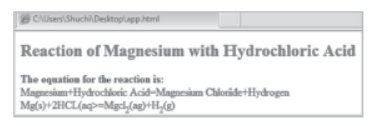
Answer. <HTML>
<HEAD>
<STYLE type = "text/css">
#para1
{
font-size: 10pt;
text-align: center;
color: blue;
}
</STYLE>
</HEAD>
<BODY>
<H2 id = "para1">Reaction of
Magnesium with Hydrochloric Acid</H2>
<B> The equation for the reaction
is:</B><BR>
Magnesium+Hydrochloric Acid =
Magnesium Chloride + Hydrogen <BR>
Mg(s)+2HCL(aq>=Mgcl<SUB>2</SUB>
(ag)+H<SUB>2</SUB>(g)
</BODY>
</HTML>
Question. Write an HTML code to display the following output.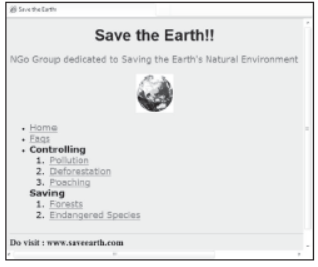
Consider the following points while writing the code
(i) Title of the page is “Save the Earth!!”.
(ii) The background color of the page is Silver.
(iii) The font used for heading is “Arial”, size is 6 and color is Black.
(iv) The sub heading is in “Verdana” font, font size is 4 and color is Brown.
(v) Rest of the text is in “Verdana” font, font size 4 and black color.
(vi) Image used is from file “Main.jpg”.
(vii) The links are provided in an unordered list with ordered list used in between.
(viii) The pages are linked as follows
Home Home.html
Faqs Faq.html
Pollution Poll.html
Deforestation Defores.html
Poaching Poach.html
Forests Forest.html
Endangered Species Specie.html
(ix) The categories ‘Controlling’ and ‘Saving’ in the unordered list are not linked to any page.
(x) The width and height of horizontal line is 820 and 80, respectively.
Note You can use any other attributes that are not mentioned above to produce a similar output.
Answer. The HTML code is
<HTML>
<HEAD><TITLE> Save the Earth </TITLE>
</HEAD>
<BODY bgcolor ="silver">
<H1>
<FONT face="arial" color="black"
size="6">
<CENTER>Save the Earth!! </CENTER>
</FONT>
</H1>
<FONT face="verdana" color="brown"
size="4">
<P align="center">NGo Group dedicated
to Saving the Earth’s Natural
Environment</P>
</FONT>
<FONT face ="verdana" color="black"
size="4">
<CENTER>
<IMG src ="Main.jpg">
</CENTER>
<UL type = "disc">
<LI>
<A href="Home.html">Home</A>
</LI>
<LI>
<A href="Faq.html">Faqs</A>
</LI>
<LI>
<B> Controlling </B>
</LI>
<OL type="1">
<LI>
<A href="Poll.html">
Pollution</A>
</LI>
<LI>
<A href="Defores.html">
Deforestation</A>
</LI>
<LI>
<A href="Poach.html">
Poaching</A>
</LI>
</OL>
<LI>
<B> Saving </B>
</LI>
<OL type="1">
<LI>
<A href="Forest.html">
Forests</A>
</LI>
<LI>
<A href="Specie.html">
Endangered Species</A>
</LI>
</OL>
</UL>
</FONT>
<HR noshade width="820"
height="80" size="2">
<B><FONT size="4">Do visit:
www.saveearth.com</FONT></B>
</BODY>
</HTML>
Question. What is the use of external style sheet? Explain its advantages and disadvantages.
Answer. With an external style sheet, you can change the look of the entire website by changing just one file. Each page must include a reference to the external style sheet, file inside the <LINK> element.
The <LINK> element goes inside the <HEAD> section. An external style sheet can be written in any text editor. The style sheet file must be saved with a .css extension.
The advantages of external style sheet are as follows
(i) With the help of external style sheets, the styles of numerous documents can be organised from one single file.
(ii) In external style sheets, classes can be made for use on numerous HTML element types in many forms of the site.
(iii) In complex contexts, methods like selector and grouping can be implemented to apply styles.
The disadvantages of external style sheet are as follows
(i) An extra download is essential to import style information for each file.
(ii) The execution of the file may be delayed till the external style sheet is loaded.
(iii) While implementing style sheets, we need to test web pages with multiple browsers in order to check compatibility issues.
Question. Observe following output and write HTML code to generate it.
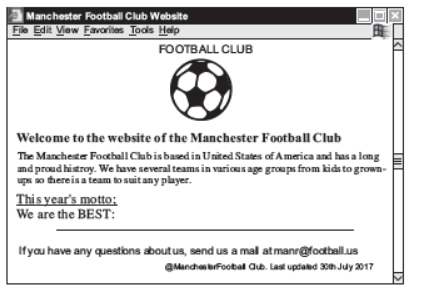
Consider the following points while generating the web page
(i) The title of the page is "FOOTBALL CLUB"
(ii) The heading is blue color
(iii) Font of entire document is arial
(iv) Image used is "football.jpeg"
(v) The page is linked to:
Proud history to "history.html"
(vi) Bottom message is of size 2.
Answer. The code is
<HTML>
<HEAD><TITLE>FOOTBALL
CLUB</TITLE></HEAD>
<BODY>
<FONT face="arial" size="3">
<H1 align="center"><FONT color="blue">FOOTBALL
CLUB</FONT></H1>
<CENTER><IMG src="football.jpg" height="150"
width="150"></CENTER>
<H3>Welcome to the website of the Manchester Football
Club</H3>
<P>The Manchester Football Club is based in United States
of America and has a long <BR>
and <A href="history.html">proud history</A>. We have
several teams in various age groups from kids to
grown-<BR>ups so there is a team to suit any player.
<BR><BR>
<U>This year’s motto:</U><BR>
We are the BEST:<BR>
<HR size="3" noshade size ="75%">
<FONT size="2"><B>If you have any questions about us,
send us a mail at manr@football.us</B></FONT><BR>
<H5 align="right">
<IMG src="copy.jpg" height="20" width="30">Manchester
Football Club. Last updated
30<SUP>th</SUP>July 2017</H5>
</FONT>
</BODY>
</HTML>
Question. Carefully study the web page given below. Identify 10 tags (structural as well as formatting tags) that have been utilised in creating this web page and write the usage of each of them.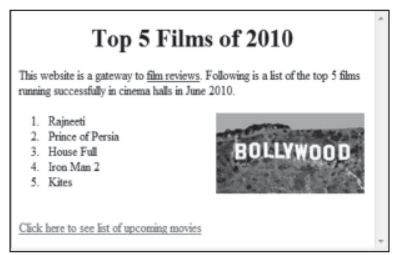
Answer. Following tags are used
(i) <HTML> Container of all the HTML elements. Tells the browser that it is dealing with an HTML document.
(ii) <BODY> It defines the document’s body. It contains all the necessary contents of HTML document that is to be displayed on web browser.
(iii) <H1> Top level of heading.
(iv) <CENTER> Used to centralise a segment of text to be displayed.
(v) <P> It is used to define the paragraph.
(vi) <OL> To insert an ordered list in the web page.
(vii) <LI> It is used to indicate a list item as contained in an ordered.
(viii) <BR> Break line tag is used to move all the text/image that follows the tag to the next line.
(ix) <IMG> This tag is used to insert the desired image into the web page.
(x) <A> Anchor tag is used to create the hyperlink.
Question. Observe the following web page and write HTML code to generate it.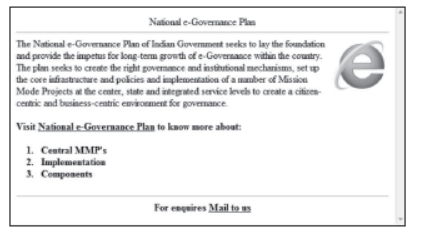
Note The following points while generating the web page:
(i) Background color of page is yellow.
(ii) Link color is black and visited link color is green.
(iii) Font style for the page is arial.
(iv) Heading of the page is maroon.
(v) Image used is gov.jpeg.
(vi) Text color of the paragraph is red.
(vii) Link for 'National e-Governance Plan' is nation.html.
(viii) E-mail id for bottom message is abc@xyz.com.
Answer. The HTML code is
<HTML>
<BODY bgcolor="yellow" link ="black"
vlink="green">
<BASEFONT face = "arial">
<CENTER>
<FONT color="maroon"><H1>
National e-Governance Plan</H1>
</FONT></CENTER><HR>
<P> <FONT color="red">
<IMG src="gov.jpeg" alt="gov" align="right">
The National e-Governance Plan of Indian Government seeks to lay the foundation and provide the impetus for long-term growth of e-Governance within the country. The plan seeks to create the right governance and institutional mechanisms, set up the core infrastructure and policies and implementation of a number of Mission Mode Projects at the center, state and integrated service levels to create a citizen-centric and business-centric environment for governance.
</FONT></P>
<BR>
<B>Visit<A href ="nation.html">
National e-Governance Plan</A> to know
more about:<BR>
<OL type ="1">
<LI>Central MMP’s</LI>
<LI>Implementation</LI>
<LI>Components</LI>
</OL></B><HR>
<CENTER>For enquires
<A href="mailto:abc@xyz.com">Mail to us
</A>
</CENTER>
</BODY>
</HTML>
1. Define XML in brief.
2. What are the difference between XML and HTML?
3. What are the rules of naming in XML?
4. Explain the following term :
(i) Virus
(ii) Worms
(iii) Trojans
(iv) Anti-Virus Software
5. Define the following :
(i) Spyware
(ii) Malware
(iii) Spams
6. Mention few ways by which virus can spread into other system.
7. Name five anti virus software.
8. Explain the various impact of the IT on people’s life.
9. What do you mean by Hacker?
10. What are the Information security provisions in e-Commerce?
Free study material for Computers
Links and CSS in HTML Printable Worksheets and Exercises for Class 10 Computers
Practice Exercises for Class 10 Computers Links and CSS in HTML
Review targeted practice exercises for Class 10 Computers Links and CSS in HTML. Curated to match official CBSE guidelines, these printable problem sets support daily revision and improve overall test readiness.
Step-by-Step Solutions and Practice Guidelines
Each worksheet draws directly from authorized standard textbooks to maintain academic accuracy. Evaluating your finished exercises against expert-verified solutions helps master the formal presentation standards expected in school evaluations.
Enhance Speed with Online Practice
Wrap up your chapter revision by testing your knowledge against standard objective question formats. Explore our full library of free, up-to-date printable assignments to maximize your academic results in upcoming CBSE evaluations.
FAQs
You can download the latest chapter-wise printable worksheets for Class 10 Computers Links and CSS in HTML for free from StudiesToday.com. These have been made as per the latest CBSE curriculum for this academic year.
Yes, Class 10 Computers worksheets for Links and CSS in HTML focus on activity-based learning and also competency-style questions. This helps students to apply theoretical knowledge to practical scenarios.
Yes, we have provided solved worksheets for Class 10 Computers Links and CSS in HTML to help students verify their answers instantly.
Yes, our Class 10 Computers test sheets are mobile-friendly PDFs and can be printed by teachers for classroom.
For Links and CSS in HTML, regular practice with our worksheets will improve question-handling speed and help students understand all technical terms and diagrams.