

Step-by-Step Textbook Solutions for Class 9 Computer Science Basic Concepts of Operating System
Review structured textbook solutions for Class 9 Computer Science Basic Concepts of Operating System. Built according to NCERT guidelines for the 2026-27 academic year, these downloadable answers support daily revision and problem-solving accuracy.
Download Basic Concepts of Operating System Textbook Solutions PDF
View or download the dedicated Basic Concepts of Operating System solution resource below. Engaging with these textbook answers under focused study conditions ensures continuous academic progress and mastery of the 2026-27 curriculum for Computer Science.
Basic Concepts of Operating System
Question. What is an operating system?
Answer: An operating system is a system software that acts as an interface between the user and the hardware resources. It provides a variety of services to the computer.
Question. Which is the first program that loads in memory?
Answer: Operating system is the first program that loads in computer’s main memory, when a computer is switched on.
Question. What do you mean by buffering?
Answer: Buffering is a technique of storing data in memory area (buffer).
Question. Data can be transferred in which form?
Answer: Data can be transferred in the form of units such as characters, words, bytes, blocks or records from one component to another.
Question. Is Windows NT a family of an operating system (s)?
Answer: Yes, it is a family of an operating system produced by Microsoft in July 1993. NT stands for New Technology.
Question. Name any two commonly used operating system.
Answer: Windows 7 and Windows XP.
Question. Who released the first Android OS Astro’?
Answer: The First Android OS ‘Astro’ was released by Google on September 20th, 2008.
Short Answer Type Questions
Question. State any two functions of operating system,.
Answer:
1. Device management
In a computer system, there is a tremendous speed mismatch between the CPU and the I/O devices. The job of an operating system is to maintain a balance between the
CPU and I/O devices. Apart from this, it has to maintain a balance between various I/O devices and has to keep the CPU busy in various processing.
2. Processor Management
A process or a job is an application program in running state. Processor management is the important part of an OS, which enables the activities of planning, monitoring and performing a process. During execution, a process needs certain resources such as CPU time, memory space, files and I/O devices.
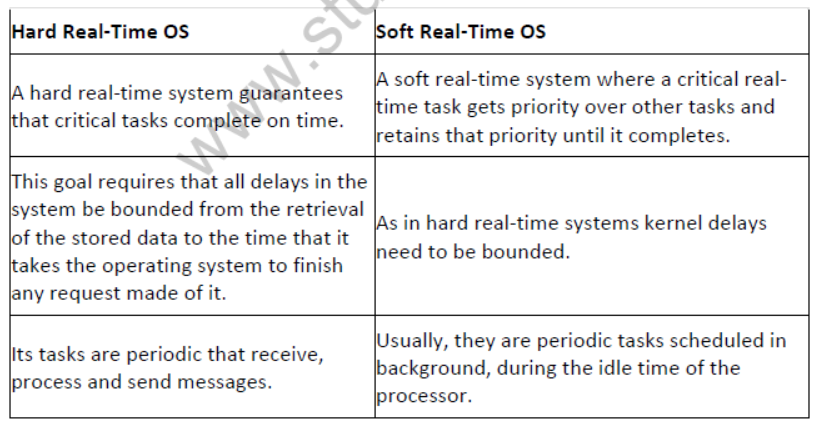
Question. Differentiate between hard and soft real-time operating systems.
Answer: Difference between hard and soft real-time OS are as follows:
Question. Which OS operates on Smartphones and explain any one type of OS?
Answer: Mobile OS is the type of OS, that operates on Smartphones, Tablets, PDAs or other Digital Mobile devices. Several types of mobile operating systems are available in market as follows:
Android, BlackBerry, iOS, Windows etc.
Android is a Mobile OS which is based on Linux kernel and primarily designed for touch screen mobile devices.
It provides access to a wide range of useful libraries and tools that can be used to build rich applications. The latest version of Android operating system is Marshmallow 6.0.
Question. What do you mean by Linux?
Answer: Linux is an open source operating system, means anyone can download it and use it without any fees.
It is similar to Unix in its working and difficult to understand. It is an OS that controls your computer system.
Question. Kernel is the central module of operating system. Explain.
Answer: Kernel is like heart of operating system which plays a vital role in modern OS. Kernel is a program that manages I/O requests and translate them into data processing instructions for CPU and other components. It is a part of the OS that loads first and it remains in the main memory.
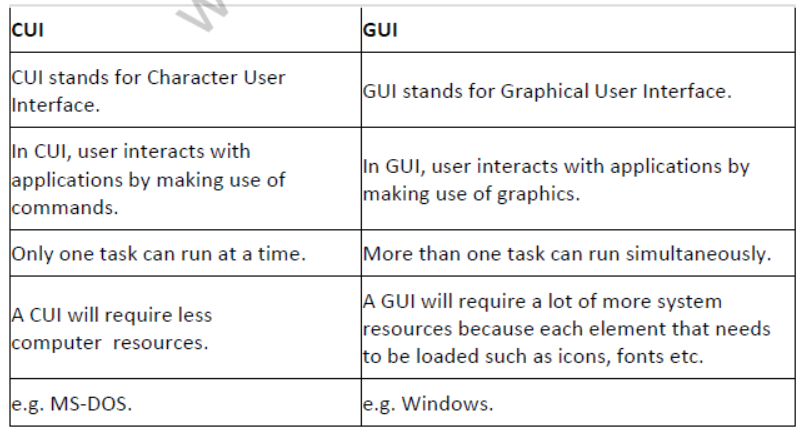
Question. Differentiate between CUI and GUI.
Answer: Differences between CUI and GUI are as follows:
Long Answer Type Questions
Question. What is used to interface between the user and the hardware?
Answer: An operating system is a system software that acts as an interface between the user and hardware resources. It controls and co-ordinates the hardware used by various application
programs. OS acts as resource allocator and manager. Since, there are many possible conflicting requests for resources, the OS must decide which requests are allocated resources to operate the computer system efficiently and fairly. An OS is a control program,which controls the user programs to prevent errors and improper use by the computer. It is especially concerned with the operation and control of I/O devices.
Main functions of an OS are as follows:
· Processor management
· Memory management
· File management
· Device management
· Storage management
Question. What do you mean by storage management?
Answer: Storage Management
It is the process, which describes the technologies and processes used by a computer to improve the performance of its data resources.
The data or files will be stored into the computers in such a way that an authorised user can easily access and use it. It is a wide process which includes virtualisation, replication, security, compression of data, traffic analysis etc.
It helps to improve the visibility control and automation for data and storage. Most programs including compilers, assemblers, Word processors etc., are stored on a disk until loaded into main memory and then, use the disk as both the source and destination of their processing. This entire process is handled by the operating system itself.
Question. Explain the two types of memory management techniques, which are used for allocating memory.
Answer: Memory Management
It is the act of managing computer’s primary memory or main memory. Main memory is a large array of words or bytes where each ward or byte has its own address. Main memory provide a fast storage that can be accessed directly by the CPU.
An operating system does the following activities:
· It keeps track of the status of each memory location either allocated or free.
· Each process must have enough memory to execute and it cannot run into the memory space of another process.
· Allocates the memory when a process requests it to do so.
· De-allocates the memory when a process no longer needs it or has been terminated.
In most of the computers, it is possible to add memory beyond the original capacity, e.g. you might expand RAM according to your system configuration and requirement. Partitioned allocation divides primary memory of computer into multiple memory.
Question. Describe a real-time operating system.
Answer: A real-time operating system has well defined fixed time constraints.Process must be done within the defined constraints otherwise the system will fail. OS for a flight control computer or an advanced Jet airplane is the example of a real-time operating system.
Often used as a control device in a dedicated applications such as controlling scientific experiments, medical imaging systems, industrial control systems and some display systems.
Real-time operating system can be classified as follows:
Hard real-time operating system It is the OS which can guarantee the maximum time for the operations it performs.
Soft real-time operating system It is the OS which cannot guarantee the maximum time for the operations it performs.
Question. What is multi-tasking and multi-user operating system?
Answer: Multi-Tasking Operating System
The OS that allows the execution of multiple tasks at one time is known as multi-tasking OS.
In this type of OS, several applications may be simultaneously loaded and used in the memory. While, the processor handles only one application at a particular time. It is capable of switching between the applications effectively, e.g. Unix, Windows 2000/XP/NT/Vista etc.
Multi-User Operating System
It is the type of OS that allows many users to take advantages of the computer’s resources,simultaneously. This OS makes sure that the requirements of the various users are balanced and each of the programs they are using has sufficient and separate resources, i.e. problem with one user doesn’t affect the entire community of users.
e.g. Unix, Linux, Windows 2000 etc.
Question. Explain some of the characteristics of modern operating systems.
Answer: Some characteristics of modern operating system are as follows:
1. Microkernel Architecture
Provide a communication facility between the client program and the various services that are also running in user space.
2. Multl-Threadlng
It is a process, which can be divided into threads, that can run simultaneously. In other words, it is the ability of an OS to execute different parts of a program called threads, simultaneously by more than one user at a time.
· Thread
It is a dispatchable unit of work. It includes a processor context program counter, stack pointer and its own data storage for the stack. It executes sequentially and is interruptible. It is a light weight process. In other words, it is the smallest sequence of program instructions in execution. Threads are managed by OS scheduler.
· Process
Process is a collection of one or more threads. Each process have its own address in memory, i.e. each process allocates separate memory area. Switching from one process to another require some time for saving and loading registers, memory maps, updating lists etc.
3. Symmetric Multi-Processing
In this processing, stand-alone computers with multiple processors that share the common memory and I/O facilities are connected by a communication bus. All processors can perform the same functions.
4. Object-Oriented Design
It is used for adding modular extensions to a small kernel. Also, it enable programmers to customise an OS without disrupting system integrity.
Question. Suchi has recently installed a new operating system on her computer.
1. Describe the main functions of an operating system.
2. What does command-driven user interface mean?
Answer:
1. Monitors the performance of the system, enables software to communicate with hardware, enables applications, software to be loaded; gives prompts and error reports to the users.
2. Command-driven user interface means CUI, by which a user gives instructions via typing command onto the computer.
Question. Some features of a specific operating system are given below:
· Free/Open source
· Virus free
· Stable, long running operating system
· Multiple work spaces
(i) Which operating system supports these features?
(ii) What is the meaning of multiple workspace?
Answer:
(i) Linux
(ii) With Linux, you get four desktop screens known as workspace.
Question. The job of an operating system is to maintain a balance between the CPU and I/O devices in the sense that it has to keep the CPU busy. How is it achieved?
Answer: It is achieved through overlapped processing.
Question. The operating system of computers has progressed from a command-driven system to a Graphical User Interface (GUI). Give the reason behind this.
Answer: A GUI allows more information to be communicated to the user through the icons, pictures etc. Icons can make it easier for a user to know what a computer is going to do after providing a command or instruction.
Question. Now-a-days many OS are available, name one Indian OS available free throughout India.
Answer: BOSS is an Indian OS. It is developed by C-DAC derived from Debian for enhancing the use of Free/Open source software throughout India.
Multiple Choice Questions
Question. An operating system manages
(a) memory
(b) processor
(c) disk and I/O devices
(d) All of these
Answer: (d)
Question. An operating system of a computer serves as a software interface between the user and the
(a) hardware
(b) peripheral
(c) memory
(d) screen
Answer: (a)
Question. Suppose you have bought all hardware components required for assembling a computer.After assembling the computer system, which will be the very first software to be installed?
(a) Hardware drivers
(b) Operating system
(c) Antivirus software
(d) Word processing software
Answer: (b)
Question. Identify the option, which is not a feature covered under device management?
(a) Speed
(b) Spooling
(c) Sharing
(d) Programming
Answer: (d)
Question. ……… is not covered under file management.
(a) Secure files
(b) Easy access to files
(c) Schedule processes
(d) Keep backup of files
Answer: (c)
Question. Which of the following is not a function of an operating system?
(a) File management
(b) Memory management
(c) Storage management
(d) Database management
Answer: (d)
Question. .……….. OS pays more attention on the meeting of the time limits.
(a) Distributed
(b) Network
(c) Real-time
(d) Online
Answer: (c)
Question. Real-time operating systems
(a) are primarily used on mainframe computers
(b) can respond quickly to an event
(c) are used for program development
(d) are used for real-time interactive users
Answer: (b)
Question. Amoeba is an example of
(a) Embedded OS
(b) Distributed OS
(c) Multi-User OS
(d) Batch Processing OS
Answer: (b)
Question. A thread is a ………… process, which is managed by OS scheduler.
(a) heavy weight
(b) multiprocess
(c) inter thread
(d) light weight
Answer: (d)
Question. Which of the following is like a heart of operating system?
(a) Kernel
(b) Thread
(c) Process
(d) Window
Answer: (a)
Question. Which of the following is not an OS?
(a) Android
(b) Windows
(c) Apple
(d) BOSS
Answer: (c)
Question. Which of the following is/are mobile operating system?
(a) Android
(b) Symbian
(c) Both (a) and (b)
(d) None of these
Answer: (c)
Question. Marshmallow 6.0 is the version of
(a) Android
(b) Symbian
(c) iOS
(d) BlackBerry
Answer: (a)
Fill in the Blanks
Question. .………… is a program that mediates between application programs and hardware.
Answer: Operating system
Question. The most common type of spooling is …………
Answer: print spooling
Question. Buffering is a ………….. management technique.
Answer: device
Question. Partitioned allocation divides primary memory of computer into ………. memory partitions.
Answer: multiple
Question. The embedded operating system is used for …………… computers.
Answer: embedded
Question. The …………….. is regarded as shell, is the layer that actually interacts with the user.
Answer: user interface
Question. …………. is a program interface that enables a user to communicate with computer through graphics or symbols.
Answer: GUI (Graphical User Interface)
Question. Symbian is the operating system developed and sold by …………..
Answer: Symbian Ltd
True or False
Question. Operating system refers to the core software components of a computer system that manages internal operations and hardware.
Answer: True
Operating system is a set of programs that control internal computer operations and make best use of hardware.
Question. CPU time, memory space are the examples of system resources.
Answer: True
System resources include many resources such as CPU time, memory space, I/O address, DMA channel to alert the need of hardware and software.
Question. The speed of an I/O device is generally different from each other.
Answer: True
Different I/O devices possess different speed from each other because of their different data access and execution time.
Question. Several applications can be opened at one time.
Answer: True
This feature comes under the multi-tasking capability of OS.
Question. Spooling handles the overlapped processing of I/O and same job.
Answer: False
It is a process of sending data to a spool or temporary storage area in the computer’s memory.
Question. The time-sharing operating system allows multiple programs share the computer resources simultaneously.
Answer: True
In time-sharing OS, a small amount of time is allocated for the processing simultaneously.
Question. Windows is a graphical user interface.
Answer: True
In Windows, we can provide commands by clicking on the icons using mouse.]
Computer Science Class 9 Curriculum Solutions: Basic Concepts of Operating System
Accessing Basic Concepts of Operating System Solutions
Explore reliable textbook solutions for Basic Concepts of Operating System tailored for Class 9 learners. Utilizing these complete exercise answers ensures your preparation aligns exactly with official NCERT standards for Computer Science.
Concept-Driven Answers for Class 9 Computer Science
Clear, methodical explanations accompany every challenging problem within the Class 9 Computer Science text. Engaging with these detailed answers lays a solid foundation for advanced learning and improves foundational clarity for upcoming assessments.
Maximizing Study Efficiency
Consistent practice with these solution guides cultivates faster problem-solving habits and clearer logical structuring. For a complete preparation experience, pair these textbook answers with our dedicated revision notes and sample papers for Class 9 Computer Science.
FAQs
The complete and updated NCERT Solutions Class 9 Computer Science Basic Concepts of Operating System is available for free on StudiesToday.com. These solutions for Class 9 Computer Science are as per latest NCERT curriculum.
Yes, our experts have revised the NCERT Solutions Class 9 Computer Science Basic Concepts of Operating System as per 2026 exam pattern. All textbook exercises have been solved and have added explanation about how the Computer Science concepts are applied in case-study and assertion-reasoning questions.
Toppers recommend using NCERT language because NCERT marking schemes are strictly based on textbook definitions. Our NCERT Solutions Class 9 Computer Science Basic Concepts of Operating System will help students to get full marks in the theory paper.
Yes, we provide bilingual support for Class 9 Computer Science. You can access NCERT Solutions Class 9 Computer Science Basic Concepts of Operating System in both English and Hindi medium.
Yes, you can download the entire NCERT Solutions Class 9 Computer Science Basic Concepts of Operating System in printable PDF format for offline study on any device.