

Practice MCQs for Class 6 Computer Science Output Devices
Access targeted multiple-choice questions for Output Devices designed to align with the latest CBSE academic syllabus for Class 6 Computer Science. These objective practice sets help students evaluate their conceptual understanding and improve exam readiness.
Access Output Devices Questions and Solutions
View or download the dedicated Output Devices MCQ resource below. Practicing these 50 objective questions regularly builds familiarity with standard exam patterns and helps secure higher marks in final Computer Science evaluations.
Fill in the Blanks using the right option:
Question: Monitor is soft and …………… is hard output device.
a) Printer
b) Plotter
c) Both of these
d) None of these
Answer: a
Question: …………… is used to listen sound from computer.
a) Printer
b) Speaker
c) Microphone
d) Mouse
Answer: b
Question: …………… prints output on paper.
a) Printer
b) Keyboard
c) Mouse
d) Speaker
Answer: a
Question: …………… printer prints by joining dots.
a) Dot matrix
b) Inkjet
c) Laser
d) None of these
Answer: a
Question: Monitor are of …………… types.
a) Two
b) Three
c) Four
d) Five
Answer: a
Question: Headphones are also called …………….
a) Earphone
b) iPhone
c) Both of these
d) None of these
Answer: a
Write down True or False:
Question: Output devices are used to get information from computer.
Answer: True
Question: We cannot listen music from computer.
Answer: False
Question: Printer is soft output device.
Answer: False
Question: There is no difference between Printer & Plotter.
Answer: False
Question: Nowadays black & white monitor are in use.
Answer: False
Short Answer type Questions:
Question: List the four types of output device?
Answer:
1. Monitor
2. Printer
3. Speaker
4. Headphone
5. Plotter
6. Projector
Question: Write the types of monitor
Answer: 1. Cathode-Ray Tube (CRT)
2. Flat- Panel Display
Question: Where are projector used?
Answer: A projector is a softcopy output device. It is used in meetings for presented multimedia presentations.
Question: List the types of printer.
Answer:
1. Dot matrix Printer
2. Inkjet Printer
3. Laser Printer
Question: Write a note on Plotter?
Answer: Plotter is a hardcopy output device. A device that draw picture on paper based on command from a computer. Plotter draws lines using a pen. It is used in CAD and engineering applications.
Long Answer type Questions :
Question: Write note on monitor and its types ?
Answer: Monitor It is most commonly used softcopy output device. Types of Monitor are
1. Cathode-Ray Tube (CRT)
2. Flat- Panel Display
Question: What is printer? Explain three types of Printer.
Answer: It is a hard output device. Printer prints output on paper. Types of Printer:
1. Dot matrix Printer: It prints by joining dots. It is cheaper. It does not produce sound. Its speed is slow.
2. Inkjet Printer: It prints by droplets of ink. It is cultured printer. It is very cheap. It does not produce sound. Its speed is faster.
3. Laser Printer: It prints by laser beams. These are black and white as well as cultured. It is costly.
Its speed is fastest.
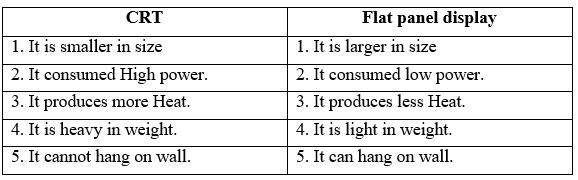
Question: Write difference between CRT & Flat panel display.
Answer:
Multiple Choice Questions (MCQs) for Class 6 Computer Science Output Devices
Class 6 Computer Science Output Devices Objective Test Questions
Test your conceptual understanding of Output Devices with these targeted multiple-choice questions. Designed in alignment with the latest CBSE curriculum for Class 6 Computer Science, these problem sets build accuracy and prepare students for objective exams.
NCERT-Aligned Objective Questions and Solutions
Built using the official NCERT book for Class 6, these Computer Science objective sets provide reliable academic guidance. Pair your practice with our recommended NCERT solutions to master optimal problem-solving approaches.
Next Steps in Your Exam Preparation
Explore our broader library of printable assignments, chapter notes, and mock tests designed to support continuous revision and secure higher marks in CBSE assessments.
FAQs
You can get most exhaustive CBSE Class 6 Computer Science Output Devices MCQs Set 02 for free on StudiesToday.com. These MCQs for Class 6 Computer Science are updated for the 2026-27 academic session as per CBSE examination standards.
Yes, our CBSE Class 6 Computer Science Output Devices MCQs Set 02 include the latest type of questions, such as Assertion-Reasoning and Case-based MCQs. 50% of the CBSE paper is now competency-based.
By solving our CBSE Class 6 Computer Science Output Devices MCQs Set 02, Class 6 students can improve their accuracy and speed which is important as objective questions provide a chance to secure 100% marks in the Computer Science.
Yes, Computer Science MCQs for Class 6 have answer key and brief explanations to help students understand logic behind the correct option as its important for 2026 competency-focused CBSE exams.
Yes, you can also access online interactive tests for CBSE Class 6 Computer Science Output Devices MCQs Set 02 on StudiesToday.com as they provide instant answers and score to help you track your progress in Computer Science.