

Revision Notes for Class 11 Informatics Practices: Hardware
Access comprehensive revision notes for Hardware using the CBSE Class 11 Informatics Practices Hardware Notes. Designed to align with the 2026-27 academic syllabus for Class 11 Informatics Practices, these concept summaries help students streamline their exam preparation and review complex topics efficiently.
Review Hardware for Class 11 Informatics Practices
Access the complete concept summary PDF for Hardware below. Regular review of these targeted notes builds familiarity with complex Class 11 Informatics Practices themes and helps secure higher marks in final school evaluations.
HARDWARE CONCEPTS
BASIC COMPUTER OPERATIONS
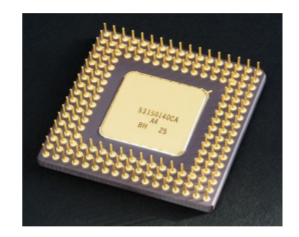
The central processing unit (CPU, occasionally central processor unit) is the hardware within a computer system which carries out the instructions of a computer program by performing the basic arithmetical, logical, and input/output operations of the system. The term has been in use in the computer industry at least since the early 1960s. The form, design, and implementation of CPUs have changed over the course of their history, but their fundamental operation remains much the same.
A computer as shown below performs basically five major operations or functions irrespective of their size and make. These are 1) it accepts data or instructions by way of input, 2) it stores data, 3) it can process data as required by the user, 4) it gives results in the form of output, and 5) it controls all operations inside a computer. We discuss below each of these operations.
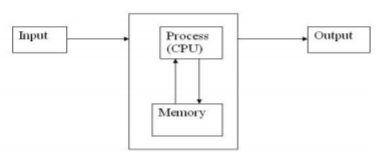
1. Input: In computing, an input device is any peripheral (piece of computer hardware equipment) used to provide data and control signals to an information processing system such as a computer or other information appliance.
2. Storage: Storage Devices are the data storage devices that are used in the computers to store the data. The computer has many types of data storage devices. Some of them can be classified as the removable data Storage Devices and the others as the non removable data Storage Devices.
The memory is of two types; one is the primary memory and the other one is the secondary memory.
The primary memory is the volatile memory and the secondary memory is the non volatile memory. The volatile memory is the kind of the memory that is erasable and the non volatile memory is the one where in the contents cannot be erased. Basically when we talk about the data storage devices it is generally assumed to be the secondary memory.
The secondary memory is used to store the data permanently in the computer. The secondary storage devices are usually as follows: hard disk drives – this is the most common type of storage device that is used in almost all the computer systems. The other ones include the floppy disk drives, the CD ROM, and the DVD ROM. The flash memory, the USB data card etc.
The storage unit performs the following major functions: All data and instructions are stored here before and after processing. Intermediate results of processing are also stored here.
3. Processing: The task of performing operations like arithmetic and logical operations is called processing. The Central Processing Unit (CPU) takes data and instructions from the storage unit and makes all sorts of calculations based on the instructions given and the type of data provided. It is then sent back to the storage unit.
4. Output: This is the process of producing results from the data for getting useful information. Similarly the output produced by the computer after processing must also be kept somewhere inside the computer before being given to you in human readable form. Again the output is also stored inside the computer for further processing.
5. Control: The manner how instructions are executed and the above operations are performed. Controlling of all operations like input, processing and output are performed by control unit. It takes care of step by step processing of all operations inside the computer.
Arithmetic Logical Unit (ALU)
In computing, an arithmetic and logic unit (ALU) is a digital circuit that performs arithmetic and logical operations. The ALU is a fundamental building block of the central processing unit of a computer, and even the simplest microprocessors contain one for purposes such as maintaining timers
Control Unit (CU)
The control unit coordinates the components of a computer system. It fetches the code of all of the instructions in the program. It directs the operation of the other units by providing timing and control signals. All computer resources are managed by the CU. It directs the flow of data between the Central Processing Unit (CPU) and the other devices
Central Processing Unit (CPU)
The ALU and the CU of a computer system are jointly known as the central processing unit. You may call CPU as the brain of any computer system. It is just like brain that takes all major decisions, makes all sorts of calculations and directs different parts of the computer functions by activating and controlling the operations.
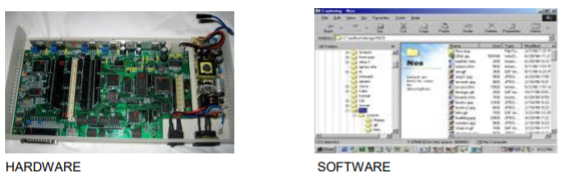
Personal Computer Configuration
Now let us identify the physical components that make the computer work. These are
1. Central Processing Unit (CPU) 2. Computer Memory (RAM and ROM) 3. Data bus 4. Ports 5.
Motherboard 6. Hard disk 7. Output Devices 8. Input Devices
All these components are inter-connected for the personal computer to work.
Memory
There are two kinds of computer memory: primary and secondary. Primary memory is accessible directly by the processing unit. RAM is an example of primary memory. As soon as the computer is switched off the contents of the primary memory is lost. You can store and retrieve data much faster with primary memory compared to secondary memory. Secondary memory such as floppy disks, magnetic disk, etc., is located outside the computer. Primary memory is more expensive than secondary memory. Because ofthis the size of primary memory is less than that of secondary memory.
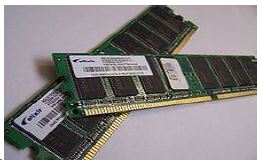
Random Access Memory (RAM): It is a form of computer data storage. A random-access device allows stored data to be accessed in very nearly the same amount of time for any storage location, so data can be accessed quickly in any random order. In contrast, other data storage media such as hard disks, CDs, DVDs and magnetic tape read and write data only in a predetermined order, consecutively, because of mechanical design limitations. Therefore the time to access a given data location varies significantly depending on its physical location. This memory is a volatile memory. The two main forms of modern RAM are static RAM (SRAM) and dynamic RAM (DRAM). .
Read Only Memory (ROM): Read-only memory (ROM) is a class of storage medium used in computers and other electronic devices. Data stored in ROM cannot be modified, or can be modified only slowly or with difficulty, so it is mainly used to distribute firmware (software that is very closely tied to specific hardware, and unlikely to need frequent updates). . The memories, which do not loose their content on failure of power supply.

INPUT DEVICES
Input devices are necessary to convert our information or data in to a form which can be understood by the computer. A good input device should provide timely, accurate and useful data to the main memory of the computer for processing followings are the most useful input devices.
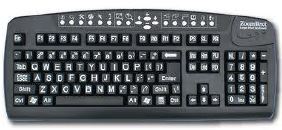
A 'keyboard' is a human interface device which is represented as a layout of buttons. Each button, or key, can be used to either input a linguistic character to a computer, or to call upon a particular function of the computer. Traditional keyboards use spring-based buttons, though newer variations employ virtual keys, or even projected keyboards. On the basis of KEYS-LAYOUT they are of two types
a) QWERTY Keyboard
b) Dvorak Keyboard
Mouse: - A pointing device is any human interface device that allows a user to input spatial data to a computer. In the case of mice and touch screens, this is usually achieved by detecting movement across a physical surface. Analog devices, such as 3D mice, joysticks, or pointing sticks, function by reporting their angle of deflection. Movements of the pointing device are echoed on the screen by movements of the pointer, creating a simple, intuitive way to navigate a computer's GUI. There are Four types of mouse
a) Mechanical Mouse
b) Opto-Mechanical Mouse
c) Optical Mouse
d) Wireless Mouse
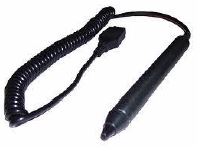
Light Pen: A light pen, also called a selector pen, is a computer input device in the form of a light-sensitive wand used in conjunction with a computer's CRT display. It allows the user to point to displayed objects or draw on the screen in a similar way to a touchscreen but with greater positional accuracy
Please click the link below to download pdf file for CBSE Class XI Informatics Practices Hardware Concepts.
Download CBSE Revision Notes: Class 11 Informatics Practices Hardware
About Hardware Revision Notes
Review targeted chapter notes for Class 11 Informatics Practices Hardware. Built according to official CBSE guidelines, these summaries highlight high-yield topics frequently tested in school evaluations.
How to Use These Revision Notes
Each chapter summary is structured around standard CBSE textbooks, allowing students to check their understanding and clarify complex ideas early in their revision.
Enhance Practice with MCQs and Worksheets
Follow up your revision by attempting the interactive online Informatics Practices MCQ test and practice worksheets for this chapter to verify your mastery. All platform resources are free to access.
FAQs
You can download the teacher prepared revision notes for CBSE Class 11 Informatics Practices Hardware Notes from StudiesToday.com. These notes are designed as per 2026-27 academic session to help Class 11 students get the best study material for Informatics Practices.
Yes, our CBSE Class 11 Informatics Practices Hardware Notes include 50% competency-based questions with focus on core logic, keyword definitions, and the practical application of Informatics Practices principles which is important for getting more marks in 2026 CBSE exams.
Yes, our CBSE Class 11 Informatics Practices Hardware Notes provide a detailed, topic wise breakdown of the chapter. Fundamental definitions, complex numerical formulas and all topics of CBSE syllabus in Class 11 is covered.
These notes for Informatics Practices are organized into bullet points and easy-to-read charts. By using CBSE Class 11 Informatics Practices Hardware Notes, Class 11 students fast revise formulas, key definitions before the exams.
No, all study resources on StudiesToday, including CBSE Class 11 Informatics Practices Hardware Notes, are available for immediate free download. Class 11 Informatics Practices study material is available in PDF and can be downloaded on mobile.