

Official Class 11 Accountancy Worksheets: Chapter 12 Applications of Computers in Accounting
Explore reliable practice materials for Chapter 12 Applications of Computers in Accounting tailored for Class 11 learners. Utilizing these Accountancy worksheets ensures thorough preparation and strengthens problem-solving speed for upcoming school assessments.
Chapter-wise Practice Material: Chapter 12 Applications of Computers in Accounting
Navigate directly to the printable exercises for Chapter 12 Applications of Computers in Accounting using the digital viewer below. Each practice set allows students to isolate specific topics for thorough review and uninterrupted practice alongside standard textbooks.
UNIT-5 : COMPUTERS IN ACCOUNTING
→ Very Short Answer Type Questions
1. Define a computer.
“A computer is a data processor that can perform substantial computations, including numerous arithmetic and logic operations, without intervention of human operator during the run.”---
International Standards Organisation
2. What are the different elements of a computer system?
A computer system ideally consists of following three major elements --- Hardware, Software and Humanware.
3. What are the advantages of a computer system over the manual system?
The advantages of a computer system over manual system are :-
(a) Speed – Computers have such a fast operating capability that the relevant unit of time is a fraction of a second.
(b) Accuracy– The computer cannot make mistakes if proper instructions are given.
(Reliability, Versatility, Storage and Retrieval.)
4. What are the different kinds of Softwares?
The different kinds of computer softwares are Operating Softwares, Utility Softwares and Application Softwares.
5. A computer cannot function without the Operating Software. Elaborate.
Operating Software is essential for a computer as through it the computer accepts command for operation. In simple words, an Operating System acts as the government of a computer system to manage its resources for their better and effective use.
6. What is meant by utility software?
Utility Software is a set of computer programs used to perform supporting operations in a computer. It usually focuses on how the computer infrastructure (including the computer hardware, operating system, application software and data storage) operates.
Name two Utility Softwares.
Disk Storage, Disk Defragmenters, File Managers, Anti-Virus, Data Compression etc.
8. What is meant by Application Software?
Application software is the user-oriented program which is designed and developed for performing certain jobs, such as accounting, word processing and designing. For example, if an enterprise has to maintain its
accounts, it will install an accounting software such as Tally or Busy.
9. Name two Application Software.
Tally, Busy, Oracle, SQL-server, My-SQL or Access.
10. What is Accounting Information system (AIS).
Accounting Information System is a structure that allows its users to collect and store business or financial data and transform it into information and communicate to its internal and external users.
11. Name two reports generated by AIS.
Debtors’ Report, Creditors’ Report, Routine Reports, Exception Reports, Financial Statements.
12. Write three advantages of AIS.
(i) It allows its user to collect and store business or financial data.
(ii) It transforms this data into information and communicates to the internal and external users .
(iii) This accounting information is used by management, consultants, CEO, regularity and tax authorities, employees etc.
13. Write the disadvantages of AIS.
(i) This information can be interpreted by only specially trained accountants to ensure accuracy.
(ii) Since the computers lack capability to judge, they cannot detect unanticipated error as human beings do.
(iii) The danger of the system crashing due to hardware failures and the subsequent loss of work is a serious limitation.
14. What do you understand by grouping of accounts?
Trial balance has a number of accounts for expenses, income, assets and liabilities. All the account heads cannot be shown in the final accounts as they will not remain understandable. Account heads are grouped in various sub-heads according to their nature and the final amount in the sub-group is shown in the final accounts.It means giving a code to each main head, sub-heads and thereafter individual account heads.
15. Give an example how you will codify a Fixed Asset -Machinery.

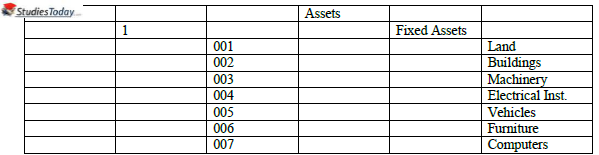
Here Fixed Asset Machinery will have the code 11003. In the above codification, it has been considered that the enterprise is a single unit enterprise.
16. What do you understand by Readymade or Off-the-Shelf Software?
Readymade Softwares are the softwares that are developed not for any specific user but for users in general. Since the Readymade softwares are for general user, it is not necessary that all the modules of such softwares are for use of every user.Eg Tally, Ex, Busy and Professional Accountant.
17. What are the advantages of Readymade Software? (Two points)
The advantages of Readymade Software are :-
(i) They are economical – Readymade softwares are prepared not for any particular user but for the user in general. It means development cost of the software is not loaded on a single software for determining the cost and thus the selling price.
(ii) Readymade softwares are available off-the-shelf – It therefore saves time that may be required for development of tailor made softwares or customization. Development of a software consumes considerable time both at the user end and software development end.
18. What do you understand by Customised Software?
The term Customised Software making changes in the readymade software to suit the specific requirement of the user, i.e. making it user specific. For example, the design of the invoice is changed to the specification of the user.
19. What do you understand by Tailor-Made Software?
The term Tailor-Made Software refers to designing and developing user specific software. They are not available off-the-shelf but are developed to meet the requirement of the user on the basis of discussion between the user and developer.
20. What are the advantages of Tailor-Made Software? (two points)
Advantages of Tailor-Made Software are :-
(i) It, being user specific, takes care of the accounting reports and MIS that may be required by the user and management of the enterprise.
(ii) The software being tailor made, the enterprise may have to engage a software engineer to maintain it. In other words the problems faced can be countered immediately.
(iii) Well-trained users use the software and, therefore, they can maximize software utilization.
→ Short Answer Type Questions
1. What is a computer? Give four features of a computer.
A computer is a data processor that can perform substantial computations, including numerous arithmetic and logic operations, without intervention of human operator during the run
The features of a computer are :-
(i) It is an electronic machine capable of performing many diversified mathematical functions at a phenomenal speed and accuracy.
(ii) They are capable of storing and retrieving data when required.
(iii) They act in response to a set of instructions called programmes and software.
(iv) It processes raw data into meaningful information.
2. Discuss the applications of Computers in Accounting.
In general every aspect of accounting is affected by computers but it is commonly used in the following areas.
(i) Recording of business transactions – Recording of business transactions through computers reduces the use of paper and also space required for storing the accounting records. In case of recording of business transactions through computers in the books of original record, posting in the concerned ledger accounts is automatically made. It means that ledger accounts contain up to date information at all times.
(ii) Accounting of debtors – Computers are very much effective in maintenance of customer’s accounts. Computers are also used for printing periodic reminders to be sent to debtors. It avoids delay in the recovery of outstanding debt.
(iii) Stores accounting – Stores accounting is the record of receipt and issue of items kept in the stores. It provides immediate information regarding stock in hand of each item. It helps the management in framing effective stock policy.
(iv) Payroll accounting – The use of computers in the payroll accounting provides correct and prompt information. Computerised accounting ensures accuracy, uniformity and promptness in the proper calculation and accounting of payrolls for the business accounting.
3. Distinguish between Hardware and Software.


4. What do you understand by Transaction Processing System (TPS)?
Processing of transactions involves classification of financial and accounting transactions through sorting, merging and updating. Reports in the form of Trial Balance, Ledger Balances and Balance Sheets can be obtained after processing. These days inbuilt accounting and other packages (a set of various programmes) are available in the market, which can perform automatic recording and classification (posting) of transactions.
Accounting as we know is the generation of financial information through recording, analyzing and summarizing business operations of financial nature. These business transactions can be recorded, analysed and summarized with speed and accuracy.
5. What are the advantages of Computerised Accounting?
The Computerised Accounting System has the following advantages.
(i) Large volume of transactions – In the present –day business environment, the transactions of a business are normally large in volume. The computerized accounting system can store and process such voluminous transactions with speed and accuracy.
(ii) Scalability – A computerized accounting system is scalable to handle the growing transactions.
(iii) Security – The accounting data under the computerized accounting environment is safer than the accounting data under the manual system. The data can be kept secure by using a password, i.e. allowing only authorized users to access the data.
(iv) Timely Reporting – Availability of reports on time enables the management to take quick decisions, which is an important element for the success of an enterprise. A computerized accounting system makes these reports available as and when required.
(v) Lower Cost – The cost of maintaining books of accounts under the computerized process is much lower than the manual process.
(vi) Flexible Reporting – Reporting under the computerized process is flexible in comparison to the manual process. The database can be processed further to obtain the report.
Please click on below link to download CBSE Class 11 Accountancy Computer In Accounting Worksheet
Free study material for Accountancy
Chapter 12 Applications of Computers in Accounting Practice Sheet and Solutions for Class 11 Accountancy
CBSE Practice Material: Class 11 Accountancy Chapter 12 Applications of Computers in Accounting
Explore reliable practice questions for Chapter 12 Applications of Computers in Accounting tailored for Class 11 Accountancy learners. Use these structured worksheets to evaluate preparedness and strengthen problem-solving skills.
NCERT-Aligned Questions and Solutions
Cross-reference your completed exercises with comprehensive NCERT solutions for Class 11 Accountancy to ensure absolute clarity across all sub-topics in this chapter.
Next Steps in Your Exam Preparation
Follow up your worksheet practice by attempting the interactive online Accountancy MCQ test for this chapter to evaluate your execution speed. All platform resources are free to access.
FAQs
You can download the teacher-verified PDF for CBSE Class 11 Accountancy Computer In Accounting Worksheet from StudiesToday.com. These practice sheets for Class 11 Accountancy are designed as per the latest CBSE academic session.
Yes, our CBSE Class 11 Accountancy Computer In Accounting Worksheet includes a variety of questions like Case-based studies, Assertion-Reasoning, and MCQs as per the 50% competency-based weightage in the latest curriculum for Class 11.
Yes, we have provided detailed solutions for CBSE Class 11 Accountancy Computer In Accounting Worksheet to help Class 11 and follow the official CBSE marking scheme.
Daily practice with these Accountancy worksheets helps in identifying understanding gaps. It also improves question solving speed and ensures that Class 11 students get more marks in CBSE exams.
All our Class 11 Accountancy practice test papers and worksheets are available for free download in mobile-friendly PDF format. You can access CBSE Class 11 Accountancy Computer In Accounting Worksheet without any registration.