

Practice MCQs for Class 3 Computers Hardware and Software
Review structured MCQ sets for Class 3 Computers Hardware and Software. Built according to official CBSE guidelines, these downloadable questions support daily revision and core concept reinforcement.
Access Hardware and Software Questions and Solutions
View or download the dedicated Hardware and Software MCQ resource below. Practicing these 50 objective questions regularly builds familiarity with standard exam patterns and helps secure higher marks in final Computers evaluations.
1. Which of the following is not a hardware?
(a) Monitor
(b) RAM
(c) Speaker
(d) Windows
Answer : D
2. Which of the following hardware devices is found inside laptops and desktop computers?
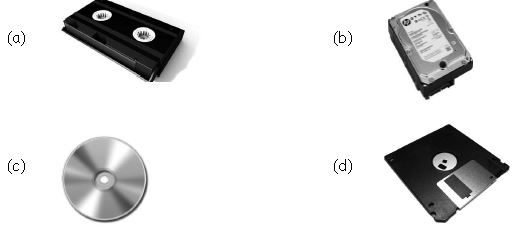
Answer : B
3. What is the name of the TV looking device which allows you to see images?
(a) Keyboard
(b) Monitor
(c) Printer
(d) Mouse
Answer : B
4. The full form of CD (Hardware device) is
(a) Compact Disk
(b) Computer Disk
(c) Compact Drive
(d) Computer Drive
Answer : A
5. The actual physical component of a computer is
(a) Hardware
(b) CPU
(c) Software
(d) Input-output
Answer : A
6. ______________ is the main circuit board (physical component) of the system.
(a) Power supply board
(b) Mother board
(c) Microprocessor
(d) Key board
Answer : B
7. Which one of the following is the main hardware part of a computer?
(a) Mouse
(b) Microprocessor
(c) Mother board
(d) Monitor
Answer : B
8. Which of the following is not hardware?
(a) CPU
(b) Memory
(c) Monitor
(d) Mouse
Answer : B
9. Software is a __________ that works in a computer.
(a) data
(b) instruction
(c) program
(d) process
Answer : C
10. We can use ______________ for reading information from a CD.
(a) Floppy drive
(b) Pen drive
(c) Mother board
(d) CD drive
Answer : D
11. Which one of the drive is used for reading information from a Floppy Disk?
(a) Rectangular Drive
(b) Compact Drive
(c) Hard Disk Drive
(d) Floppy Drive
Answer : D
12. USB stands for
(a) Universal Serial Bus
(b) Universal Synchronous Bus
(c) Uniform Serial Bus
(d) Uniform Synchronous Bus
Answer : A
13. Select the INCORRECT match.
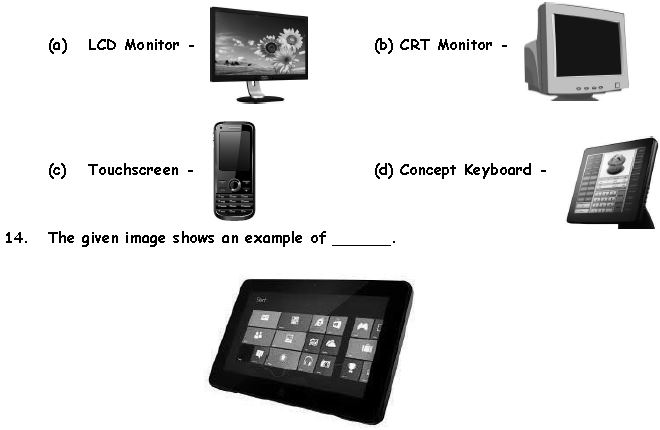
(a) Monochrome monitor
(b) CRT monitor
(c) Keyboard
(d) Touchscreen
Answer 13: C
Answer 14: D
15. Which of the following is an INCORRECT match?
(a) Pentium5 – Scanner
(b) CRT – Monitor
(c) QWERTY – Keyboard
(d) Laser – Printer
Answer : A
16. Which of the following devices helps you to click photos and store them for later use?

Answer : C
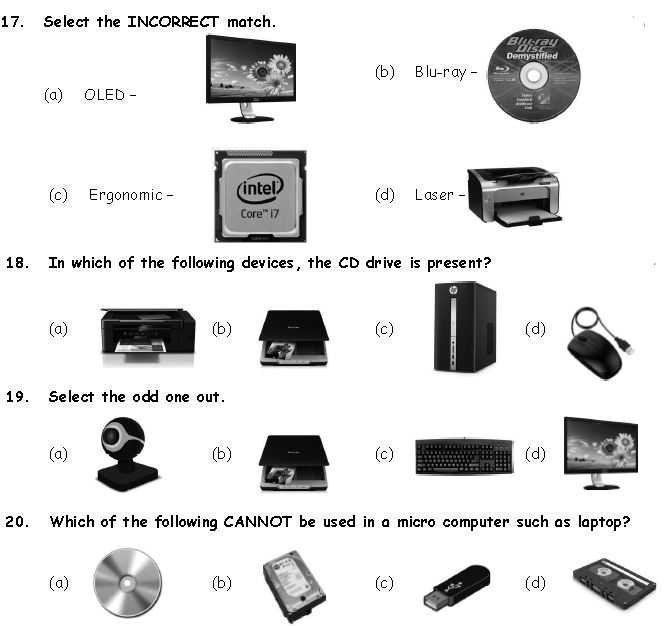
Answer 17: C
Answer 18: C
Answer 19: D
Answer 20: D

Answer : C
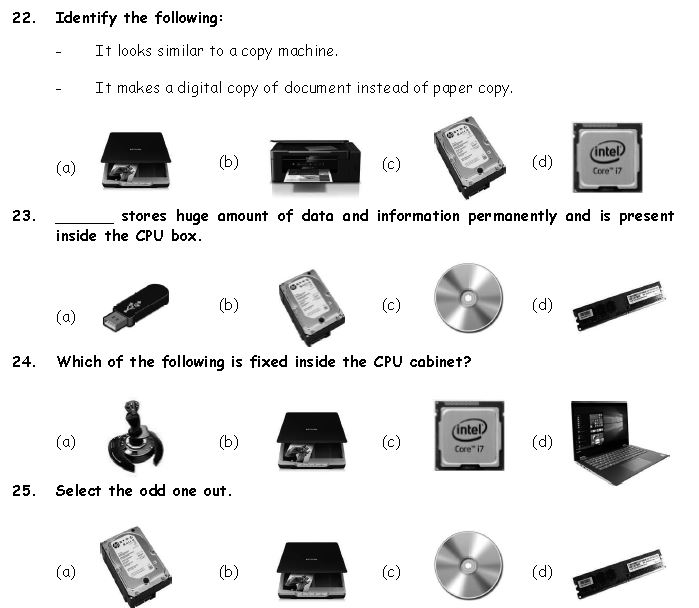
Answer 22: A
Answer 23: B
Answer 24: C
Answer 25: B
26. It reads pictures, words or numbers from a page directly and can change them into a form that a computer can understand. Identify it.

Answer : B
27. Match the following columns.
| Column-1 | Column-2 |
| A. The device which provides power to a computer | 1. Hard disk (If there is a power failure). |
| B. The scan image and printed text convert into digital image is known as | 2. UPS |
| C. It helps up to point at and selects things on computer screen | 3. Scanner |
| D. It store the data permanently | 4. Mouse. |
Answer : A
28. Given below the figures of the parts of a computer. Match them correctly with the details given on the other side.
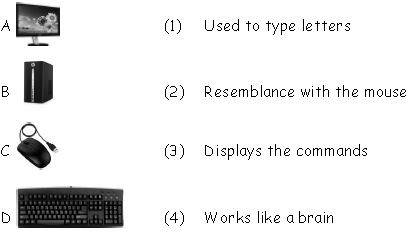
(a) A → 4, B → 3, C → 2, D → 1
(b) A → 1, B → 2, C → 3, D → 4
(c) A → 3, B → 1, C → 2, D → 4
(d) A → 3, B → 4, C → 2, D → 1
Answer : D
29. In computing, which one of the following is a device that optically scans images, printed text, handwriting or an object and converts it into a digital image?

Answer : B
30. Identify the given device It reads pictures, words or numbers from a page directly and can change them into a form that a computer can understand.
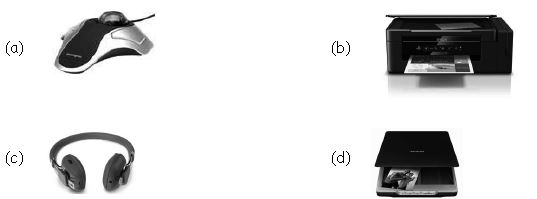
Answer : D
31. Which of the following is a multifunction device, it consists of printer, scanner, fax and photocopier?
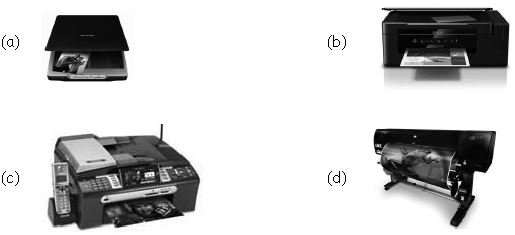
Answer : C
32. Which of the following hardware device is connected to software then converts human speech into commands or text?
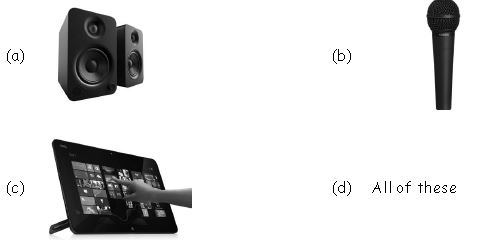
Answer : B
33. Which of the following statements is/are correct about the given device?
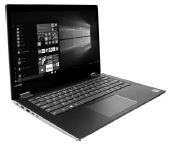
1. It is a general purpose personal computer.
2. It has monitor, keyboard, touch pad, CD/DVD drive, and hard drive.
3. It is a battery operated package.
(a) Only (1)
(b) Both (2) & (3)
(c) Both (1) & (2)
(d) All (1), (2) & (3)
Answer : D
34. Which of the following statements is/are correct about the given hardware device?
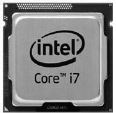
1. It controls all the functions of CPU.
2. It is known as processor and also says brain of computer.
(a) Only (1)
(b) Only (2)
(c) Both (1) & (2)
(d) Neither (1) Nor (2)
Answer : C
35. Please select the odd one from the five major Hardware components of a desktop computer.
i. Monitor ii. CPU/System Unit iii. RAM iv. Printer v. Mouse & Keyboard
(a) Monitor
(b) Mouse & Keyboard
(c) Printer
(d) RAM & CPU/System Unit
Answer : C
36. Which type of software is used for performing a certain type of work?
(a) Operating system
(b) Application software
(c) System software
(d) Bios software
Answer : B
37. Which of the following statements is wrong?
(a) A program is a set of instructions.
(b) ROM stands for read only memory.
(c) Keyboard is hardware.
(d) LOGO is system software.
Answer : D
38 Which computer peripheral device allows the computer to produce sound?
(a) Mother board
(b) SMPS
(c) Modem
(d) Sound card
Answer : D
39. Application software runs within the
(a) Operating system software
(b) Compiler software
(c) Bios program
(d) Interpreter software
Answer : C
40. Name the device which is used to record voice in a computer.
(a) Microphone
(b) Modem
(c) SMPC
(d) Sound card
Answer : A
41. Which of the following connectors generally connects a USB mouse to the computer?
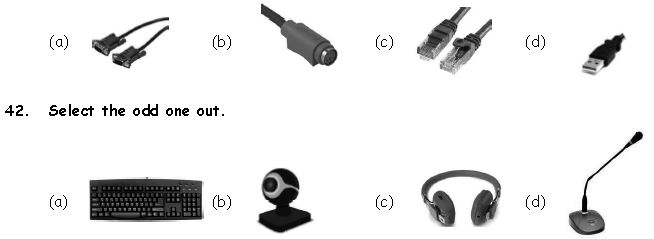
Answer 41: D
Answer 42: C
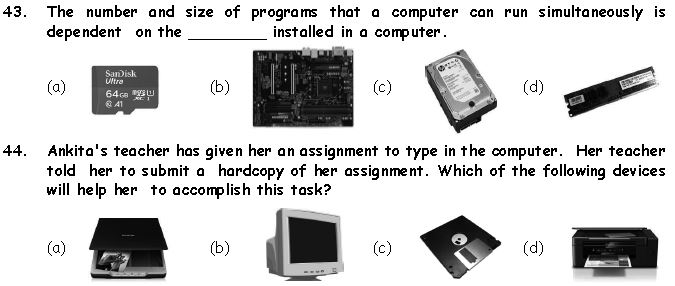
Answer 43: D
Answer 44: D
45. Which of the following is the CORRECT way to open a program in computer?
(a) Right click on the selected program and click open in context menu
(b) Double click on its shortcut
(c) Select the program icon and press enter
(d) All of these
Answer : D
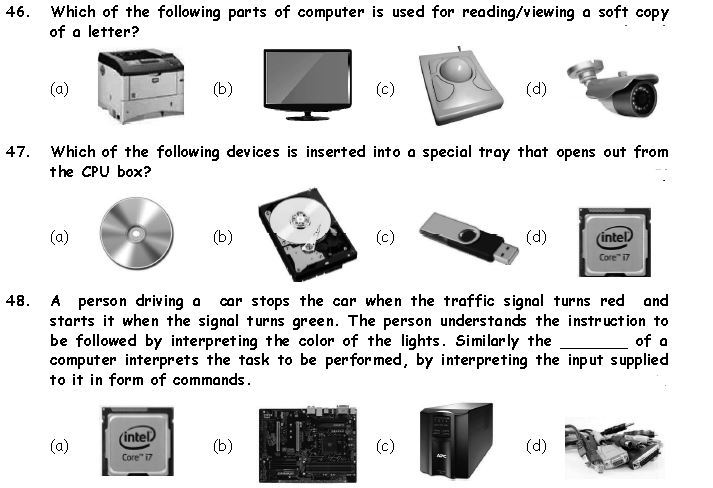
Answer 46: B
Answer 47: A
Answer 48: A
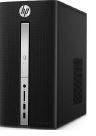
49. Which of the following statements hold(s) true about the given device?
Statement 1 : It contains the parts/chips which operates on data.
Statement 2 : It also contains the memory unit of a computer.
(a) Only Statement 1
(b) Only Statement 2
(c) Both Statement 1 and Statement 2
(d) Neither Statement 1 nor Statement 2
Answer : C
50. Identify the following:
- It's manages all the input, output and storage devices attached to a computer.
- It's manages all the programs installed into a computer.
- It's acts as a controller of a computer system.
(a) Operating System
(b) Gadgets
(c) Accessories
(d) Recycle Bin
Answer : A
Attempt Mock Tests on this topic
Download Chapter MCQs: Class 3 Computers Hardware and Software
Download Multiple Choice Questions: Hardware and Software (Class 3 Computers)
Review structured objective questions for Class 3 Computers Hardware and Software. Built according to official CBSE guidelines, these MCQ sets support daily revision and core concept reinforcement.
Concept Clarification for Hardware and Software
Each question includes structured solution keys mapped directly to standard CBSE textbooks, helping students evaluate their reasoning and correct mistakes early in their revision.
Additional Study Resources for Class 3 Computers
Explore our broader library of printable assignments, chapter notes, and mock tests designed to support continuous revision and secure higher marks in CBSE assessments.
FAQs
You can get most exhaustive CBSE Class 3 Computer Hardware and Software MCQs for free on StudiesToday.com. These MCQs for Class 3 Computers are updated for the 2026-27 academic session as per CBSE examination standards.
Yes, our CBSE Class 3 Computer Hardware and Software MCQs include the latest type of questions, such as Assertion-Reasoning and Case-based MCQs. 50% of the CBSE paper is now competency-based.
By solving our CBSE Class 3 Computer Hardware and Software MCQs, Class 3 students can improve their accuracy and speed which is important as objective questions provide a chance to secure 100% marks in the Computers.
Yes, Computers MCQs for Class 3 have answer key and brief explanations to help students understand logic behind the correct option as its important for 2026 competency-focused CBSE exams.
Yes, you can also access online interactive tests for CBSE Class 3 Computer Hardware and Software MCQs on StudiesToday.com as they provide instant answers and score to help you track your progress in Computers.