

Revision Notes for Class 11 Informatics Practices: All topics
Access comprehensive revision notes for All topics using the CBSE Class 11 Information Practices Full Study Material. Designed to align with the 2026-27 academic syllabus for Class 11 Informatics Practices, these concept summaries help students streamline their exam preparation and review complex topics efficiently.
Review All topics for Class 11 Informatics Practices
Navigate directly to the revision notes for All topics using the digital viewer below. Each summary is structured to highlight high-weightage sections, allowing students to instantly access critical definitions and focus on core exam topics.
UNIT-1
HARDWARE CONCEPTS
BASIC COMPUTER OPERATIONS
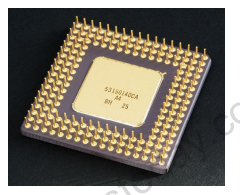
The central processing unit (CPU, occasionally central processor unit) is the hardware within a computer system which carries out the instructions of a computer program by performing the basic arithmetical, logical, and input/output operations of the system. The term has been in use in the computer industry at least since the early 1960s. The form, design, and implementation of CPUs have changed over the course of their history, but their fundamental operation remains much the same.
A computer as shown below performs basically five major operations or functions irrespective of their size and make. These are 1) it accepts data or instructions by way of input, 2) it stores data, 3) it can process data as required by the user, 4) it gives results in the form of output, and 5) it controls all operations inside a computer. We discuss below each of these operations.
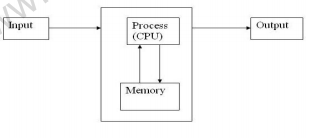
1. Input: In computing, an input device is any peripheral (piece of computer hardware equipment) used to provide data and control signals to an information processing system such as a computer or other information appliance.
2. Storage: Storage Devices are the data storage devices that are used in the computers to store the data. The computer has many types of data storage devices. Some of them can be classified as the removable data Storage Devices and the others as the non removable data Storage Devices. The memory is of two types; one is the primary memory and the other one is the secondary memory.
The primary memory is the volatile memory and the secondary memory is the non volatile memory. The volatile memory is the kind of the memory that is erasable and the non volatile memory is the one where in the contents cannot be erased. Basically when we talk about the data storage devices it is generally assumed to be the secondary memory.
The secondary memory is used to store the data permanently in the computer. The secondary storage devices are usually as follows: hard disk drives – this is the most common type of storage device that is used in almost all the computer systems. The other ones include the floppy disk drives, the CD ROM, and the DVD ROM. The flash memory, the USB data card etc.
The storage unit performs the following major functions: All data and instructions are stored here before and after processing. Intermediate results of processing are also stored here.
3. Processing: The task of performing operations like arithmetic and logical operations is called processing. The Central Processing Unit (CPU) takes data and instructions from the storage unit and makes all sorts of calculations based on the instructions given and the type of data provided. It is then sent back to the storage unit.
4. Output: This is the process of producing results from the data for getting useful information. Similarly the output produced by the computer after processing must also be kept somewhere inside the computer before being given to you in human readable form. Again the output is also stored inside the computer for further processing.
5. Control: The manner how instructions are executed and the above operations are performed. Controlling of all operations like input, processing and output are performed by control unit. It takes care of step by step processing of all operations inside the computer.
Please click the link below to download pdf file for CBSE Class 11 Information Practices Full Study Material.
Study Material and Revision Notes for Class 11 Informatics Practices All topics
About All topics Revision Notes
Explore reliable chapter overviews for All topics tailored for Class 11 learners. Use these structured points to grasp difficult themes and ensure solid preparation for upcoming assessments.
How to Use These Revision Notes
Cross-reference your comprehension with comprehensive NCERT solutions for Class 11 to ensure absolute clarity across all sub-topics in this chapter.
Enhance Practice with MCQs and Worksheets
Explore our broader library of printable assignments, chapter notes, and mock tests designed to support continuous revision and secure higher marks in CBSE assessments.
FAQs
You can download the teacher prepared revision notes for CBSE Class 11 Information Practices Full Study Material from StudiesToday.com. These notes are designed as per 2026-27 academic session to help Class 11 students get the best study material for Informatics Practices.
Yes, our CBSE Class 11 Information Practices Full Study Material include 50% competency-based questions with focus on core logic, keyword definitions, and the practical application of Informatics Practices principles which is important for getting more marks in 2026 CBSE exams.
Yes, our CBSE Class 11 Information Practices Full Study Material provide a detailed, topic wise breakdown of the chapter. Fundamental definitions, complex numerical formulas and all topics of CBSE syllabus in Class 11 is covered.
These notes for Informatics Practices are organized into bullet points and easy-to-read charts. By using CBSE Class 11 Information Practices Full Study Material, Class 11 students fast revise formulas, key definitions before the exams.
No, all study resources on StudiesToday, including CBSE Class 11 Information Practices Full Study Material, are available for immediate free download. Class 11 Informatics Practices study material is available in PDF and can be downloaded on mobile.