

Chapter-wise Worksheets for Computer Science: Configuring a Computer
Review targeted academic worksheets with the Configuring a Computer Computer Science Exercise. Built according to official educational standards for the 2026-27 term, these downloadable Computer Science resources support effective daily practice and detailed self-evaluation for Configuring a Computer.
Practice Computer Science Worksheets: Configuring a Computer
View or download the dedicated Configuring a Computer Computer Science Exercise resource below. Engaging with these practice papers under focused study conditions ensures continuous academic progress and mastery of the 2026-27 curriculum for Configuring a Computer.
One Mark Question and Answer
Question. What is program counter?
Answer. It keeps track of the memory address of the instruction that is to be executed next.
Question. What is meant by plug and play cards?
Answer. It enables the user to add devices to computer.
Question. What is the use of registers in CPU?
Answer. It is used to store intermediate data and instructions.
Question. What is the function of MDR / MBR?
Answer. It contains the data to be written into or read from memory location addressed by MAR.
Question. Expand SD RAM.
Answer. Synchronous Dynamic Random Access Memory.
Question. Expand DDR RAM.
Answer. Double Data Rate Random Access Memory.
Question. What is the function of IR?
Answer. It contains the instruction that is being executed.
Question. What is the function of MAR?
Answer. It specifies the address of memory location from which data or instruction is to be accessed or to which the data is to be stored.
Question. What is the purpose of Instruction Decoder?
Answer. It decodes the instructions.
Question. Name the components of CPU
Answer. a) ALU b) PC c) Accumulator d) MAR e) IR f) ID g) MDR
Question. What is a data bus?
Answer. It carries a word to or from memory.
Question. What is the function of control bus?
Answer. It carries signals between the units of the computer.
Question. Name different I/O ports.
Answer. Port is a socket on the back of computer. Different types of ports are serial ports, parallel ports and USB ports.
Question. What is an address bus?
Answer. It carries memory address. The width of address bus equals the number of bits in the MAR.
Two Marks Questions and Answer
Question. Explain USB Port (Universal Serial Bus).
Answer. a. It is a high speed serial bus
b. It is a plug and play interface between computers and add on devices.
Question. Give the specifications of inkjet printer.
Answer. a. Resolution is around 300 dots per inch.
b. Speed varies from 1PPM to 12 PPM
c. Buffer size varies from 1 MB to 4 MB.
Question. Give the specifications of dot matrix printer.
Answer. a. Print head normally has 9 pins to 24 pins.
b. Speed varies from 30 to 300 characters per second.
c. Buffer size varies from 1K to 64 K.
Question. Give the specifications of Laser printer.
Answer. a. Resolution varies from 600 to 1200 dots per inch.
b. Speed varies from 4 PPM to 24 PPM.
c. Buffer size varies from 4MB to 32 MB
d. Can print color images.
Five Marks Questions and Answer
Question. Write a note on Computer virus.
Answer. Viruses are collection of coded instructions which are self replicating. When a virus attaches itself to another file it infects it. They are normally inactive until infected program is run.
They are broadly classified into three categories.
a. Boot infectors
b. System infectors
c. Executable program infectors
Boot infectors: Create bad sectors. They remain in the memory until the system is shutdown.
System infectors It infects the hard disk or: bootable floppies which may contain system files.
Executable program infectors: These are dangerous and devastating. They spread to almost any executable program attaching themselves to programming files.
Question. What are the possible threats to a computer system and how to provide security?
Answer.
Threats
a. Privacy
b. Integrity
c. Environmental damage
d. Human threats
e. Software threats
f. Unauthorized access
g. Computer viruses
Security
a. Physical protection of machine and media.
b. Giving passwords and users ID
c. Using Licensed software
d. Use of Cryptography
e. Use of Spike busters and UPS
Question. Write a note on components of motherboard.
Answer.
1) Bus : -
a. Address Bus
b. Data Bus
c. Control Bus
2) Expansion slots: They serve the purpose of adding functionality to the computer.
a. ISA : Industrial standard architecture.
b. PCI : Peripheral component interface
c. AGP : Accelerated Graphic port.
3) CACHE Memory: It is a small fast memory that resides between CPU and main memory.
4) CMOS (Complementary Metal Oxide Semiconductor Battery )
5) I-O Ports ( Input –Output Ports ): Serial , Parallel , USB etc.,
Question. Explain the typical causes of computer failures.
Answer. a. Break down of components.
b. Excessive dust or humidity
c. Virus
d. Voltage fluctuation
e. Corrosion
Question. Write a note on computer maintenance.
Answer. a. Avoid heat dust and noise
b. Periodic updates and enhancements
c. Installing fire walls and anti virus.
d. In house software maintenance
e. Computer periodic checkup.
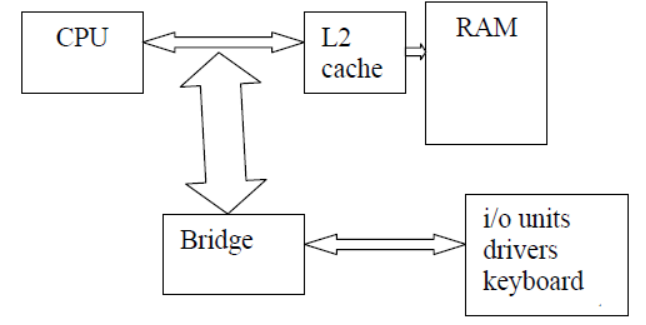
Question. Explain the cache memory in detail.
Answer. Cache memory is a small and fast memory between CPU and main memory. It is extremely fast compared to normal memory. Transferring data between main memory and CPU causes delay because RAM is slower than CPU. Cache memory stores copies of data from most frequently used main memory locations. When processor needs to read from or write to a location in main memory, it first checks whether a copy of data is in the cache. If so processor immediately reads or writes to cache. Computers use multilevels of cache such as Level1(smallest)and Level2 cache.CPU resident cache is known as L1 or primary cache (16 to 32 KB) to 512 KB.Cache is also added to mother board also known as L2 cache (512 KB to 1024 KB). Higher end systems can have as much as 2 MB of L2 cache on mother board.
Question. Explain the General Structure of CPU.
Answer. Program counter: This register stores address of next instruction to be executed.
Memory address register (MAR): This register specifies address in memory where information can be found. This register is also used to point to a memory locations where information can be stored.
Memory buffer register: This register acts as an interface between CPU and memory. When CPU issues a Read Memory command, instruction is fetched and placed in MB register.
Instruction register-This stores a copy of current instruction.
Instruction decoder (ID): ID is an electronic hardware, which decodes instructions. The instructions are further broken down into a set of micro operations, so that they can be executed directly.
General purpose registers: They are used to store data. There are 6 GP registers. These are used for storage of data as needed by the program.
Arithmetic logic unit: The basic arithmetic operations such as addition,subtraction,multiplication and division are carried out here. These operations need atleast two operands, one which is stored in accumulator and the other in the MBR. After the manipulation of data in ALU, the result is transferred to accumulator.
Accumulator: During processing the intermediate data needed for future processing is stored in accumulator. The contents of ACC are used by ALU for operations and later by MBR holds the final result for further action.
Question. Explain the different factors affecting the processing speed of CPU.
Answer. CPU Speed/Clock speed: Speed of CPU also known as clock speed. The clock speed is the number of instructions executed by the CPU in one second It is measured in megahertz(million instructions per second). The average speed of a new CPU is about 1000MHz to 4000 MHz.(1 to 4 giga hertz).
- Instruction set: The number of instructions decide the efficiency of a CPU. More the instructions , less efficient is the CPU and less the instructions, More efficient is the CPU.
- Word size/Register size: The size of registers determines the amount of data the computer can work with at a time. Normally it is 32 bits. Smaller the size of register, slower will be the computer.It is also known as Word size. It varies from 16 bits to 128 bits.
- Data bus capacity: Width of a data bus determines the largest number of bits that can be transported at one time.
- Cache Memory size: Cache memory is a high speed memory. Greater the cache, faster a processor runs. Most modern processors can execute multiple instructions per clock cycle which speeds up a program. Some CPU’s have storage for instructions and data built inside the processor chip . This is called internal cache or L1 cache memory.
- Memory Size: The amount of PRIMARY STORAGE (RAM) determines the size of program that can be kept in primary storage, which is faster than secondary storage. There by the speed of computer increases. The size of RAM varies from 64 MB to 4 GB.
Free Computer Science Practice Worksheets: Computer Science Configuring a Computer
Daily Practice Questions for Computer Science
Review targeted practice exercises for Computer Science Configuring a Computer. Curated to match official Computer Science guidelines, these printable problem sets support daily revision and improve overall test readiness.
Detailed Answers for Computer Science Configuring a Computer
Built using official NCERT guidelines for Computer Science, these practice sheets provide reliable academic support. Cross-reference your completed work with our detailed solutions to learn standard answer-writing formats for Computer Science exams.
Complete Your Chapter Revision
Wrap up your chapter revision by testing your knowledge against standard objective question formats. Explore our full library of free, up-to-date printable assignments to maximize your academic results in upcoming Computer Science evaluations.
FAQs
You can download the latest chapter-wise printable worksheets for Computer Science Configuring a Computer for free from StudiesToday.com. These have been made as per the latest Computer Science curriculum for this academic year.
Yes, Computer Science worksheets for Configuring a Computer focus on activity-based learning and also competency-style questions. This helps students to apply theoretical knowledge to practical scenarios.
Yes, we have provided solved worksheets for Computer Science Configuring a Computer to help students verify their answers instantly.
Yes, our Computer Science test sheets are mobile-friendly PDFs and can be printed by teachers for classroom.
For Configuring a Computer, regular practice with our worksheets will improve question-handling speed and help students understand all technical terms and diagrams.