

Computer Science Practice Sheet: C Programming Computer Science Exercise
Review targeted academic worksheets with the C Programming Computer Science Exercise. Built according to official educational standards for the 2026-27 term, these downloadable Computer Science resources support effective daily practice and detailed self-evaluation for C Programming .
Download C Programming Worksheet PDF with Answers
Access the complete worksheet PDF for Computer Science below. Regular practice with these targeted academic tasks builds familiarity with standard question patterns and helps secure higher marks in final school examinations.
ARRAYS
One Mark Question and Answer
Question. How are elements of an array accessed?
Answer. Elements of an array are accessed using subscripts.
Question. Write the syntax for declaring a two dimensional array.
Answer. Syntax: datatype arrayname [row size] [column size];
Question. How many subscripts does a one and two dimensional array have?
Answer. one dimensional array has one subscript and a two dimensional array has two subscripts( row and a column subscript).
Question. What do you mean by initializing an array?
Answer. Initializing of an array means storing data in to an array at the design time.
Question. What is a subscript?
Answer. A subscript or an index is a positive integer value that identifies the storage position of an element in the array.
Question. Which is the smallest subscript?
Answer. 0
Question. What is an array?
Answer. An array is a group of data of the same data type stored in successive storage locations.
Question. Write the syntax for declaring a one dimensional array.
Answer. syntax: datatype arrayname [size];
Two Mark Question and Answer
Question. How to output the elements of one dimensional array?
Answer. To print elements of an array a for loop is used.
Ex: int a[10];
For(i=0;i<10;i++)
Printf(“%d\n”,a[i]);
Question. How do you print a matrix? Give ex.
Answer. A two dimensional array can be printed as follows-
Int a[3][4];
For(i=0;i<3;i++)
{
For(j=0;j<4;j++)
{
Printf(“%d\t”,a[i][j]);
}
Printf(“\n”);
}
Question. How one dimensional array is initialized?
Answer. The initialization can be done two ways –
- Initialization at design level- in this method of initialization the data values are stored in to the array at the time of array declaration. Ex: int a [0]={10,-50,20,300,5};
- Initialization at run time- to initialize an array at run time means to input data values in to the array at the time of execution of the program. Ex: int a[10];
For (i=0;i<10;i++)
Scanf(“%d”,&a[i]);
Question. How two dimensional arrays are initialized?
Answer.
- initialization at design time- the data element are stored in to the array at the time of declaration of the array. The elements of each row and each column are represented within the pair of flower brackets. Ex: int a[3][3]={1,3,5,3,7,82,5,8};
- initialization of the array at the time of execution- to input data in to two dimensional array, two for loops are used foe every value of the outer loop index.
The inner loop is executed a specified number of times. Ex: int a[4][5];
For(i=0;i<4;i++)
For(j=0;j<5;j++)
Scanf(“%d”,&a[i][j]);
STRINGS
One Mark Question and Answer
Question. Write the syntax for declaration of a string.
Answer. syntax: char arrayname [size];
Ex: char str [100];
Question. Write an example for string initialization.
Answer. char str[100] ={“MYSORE CITY”};
Question. Which header file is needed to perform string operation?
Answer. #include<string.h>
Question. What is the difference between gets() and scanf() function?
Answer. gets() function receives a string input up to the end of the line or a new line character.
This means the string may have blank spaces and punctuations.
Scanf() function accepts a string only up to the first blank space or punctuation.
Question. State the difference between a null character and a null sting.
Answer. A null character indicates the end of the string.
A null string is a string with zero characters or no characters.
Question. What is a string?
Answer. A string is a sequence of one or more characters.
Question. Which header file is needed to perform character operations?
Answer. #include<ctype.h>
Five Mark Question and Answer
Question. Explain the various string operations with examples.
(note:Write any 5 string operations with syntax and example)
Answer.
strupr() – this function converts a string to upper case.
syntax: strupr(str1);
Ex: strupr(“hello world”)= HELLO WORLD
strlwr() – this function converts a string to lower case.
Syntax: strlwr(str1)
Ex: strlwr(“BANGALORE”)=Bangalore
strlen() – this function returns the length of the string. The function returns the number of characters in the strings.
Syntax: strlen(str1)
Ex: strlen(“ hello world”)=11
strcat()- this function concatenates(combines) two or more stings in to a single string.
strcat(str1,str2)
Ex: x=”beau” y=”tiful” strcat(x, y)=beautiful
strrev()- this function reverses the string.
Syntax:strrev(str1)
Ex: strrev(“hello”)=olleh
strcpy()-this function copies a string to a variable.
Syntax:strcpy(str1,str2)
Ex: strcpy(x,”moonlight”) x=”moonlight”
strcmp()- this function compares the two syrings and returns the ascii difference between the two strings. This is case sensitive.
Syntax:Strcmp(str1,str2)
Ex: strcmp(“their”,”there”)=-9
strcmpi()- this function compares specified number of characters from both the strings and returns a value. This function is case insensitive.
Ex: strcmpi(“There”,”there”)=0
Question. Explain the various character functions with example.
(when a question is asked for 5 marks ,write any 5 functions with example)
Answer.
tolower()- this function convert a character to lower case. Ex:tolower(‘A’)=a
toupper()- this function converts a character to upper case.
Ex: toupper(‘b’)=B
toascii()- this function converts character to its ascii equivalent. The output is an integer.
Ex: toascii(‘a’)=65
isalpha()- this function checks if a given character is an alphabet or not.
Ex: isalpha(‘a’)=true isalpha(‘*’)=false
isdigit()- checks if a given character is a digit or not.
Ex: isdigit(‘8’)= true isdigit(‘I’)=false
isspace()- checks if a given character is a white space or not.
Ex: isspace(‘ ‘)=true isspace(‘%’)=false
ispunct()- checks if a given character is a punctuation or not.
Ex: ispunct(‘?’)=true ispunct(‘ “)=false
islower()- checks if a given character is in lower case or not.
Ex: islower(‘a’)=true islower(‘L’)=false
isupper()- checks if a given character is in uppercase or not.
Ex: isupper(‘M’)=true isupper(‘h’)=false
FUNCTIONS
One Mark Question and Answer
Question. What does the return-type-specifier of a function identify?
Answer. It identifies the type of value, which will be sent back after the function has performed its task (eg: int, float).
Question. What are actual parameters?
Answer. The arguments (values) which are passed to the function when a function call is made are called actual parameters.
Question. What are formal parameters?
Answer. The arguments which are used in the argument list of the function header to receive the values from the calling program are called formal parameters or dummy parameters.
Question. What is a function?
Answer. A function is a small segment of the program(sub program) designed to perform a specific task and return a result to the main or calling program.
Question. What are library functions?
Answer. Some of the operations are programmed and stored in C library so that they can be called in the program. These functions are called as library functions.
Eg : printf(), sqrt(), pow()
Question. What are storage classes?
Answer. A storage class refers to the scope and life time of a variable i.e., the portion of
program where the variable is valid and how long a variable can retain its value is defined
in the storage class.
Question. What is a user defined function?
Answer. A user-defined function is a complete and independent program unit, which can be used(or invoked) by the main program or by other sub-programs.
Question. Mention the need for a function
Answer. If there are a number of statements that are repeatedly needed in the same program at different locations,then a function may be used.
Question. What do you mean by a calling function?
Answer. Once the function is created it can be called from the main program or from any other function. This main program or the function which calls another function is called calling function.
Question. What are the different types of functions supported in “C” language?
Answer. C supports two types of functions. They are
1. Built-in / Library functions
2. User defined functions
Question. What is a called function?
Answer. The user-defined function which is called by the main program or from any other function is known as called function.
Question. What is an argument?
Answer. Information or values are passed to the function through special identifiers are called arguments.
Question. How is a function invoked?
Answer. A function is invoked(or called) through an output statement or through an assigement statement by using the function name followed by the list of arguments.
Ex: p = prod(x, y);
Question. What is function prototype?
Answer. A function must be declared before it is actually called. The declaration of a function is known as function prototype.
Question. What is the use of the return statement?
Answer. The return statement is used in the body of the function which contains the value
that has to be sent back to the main program.
Question. Give the syntax of a function call?
Answer.A function call has the following syntax:
variable = function_name(arg1,arg2…);
where arg1, arg2… are the actual parameters.
Question. Why is the return type void used?
Answer. The return type void is used if the function does not return any value to the calling function.
Question. What are local variables?
Answer. Variables declared inside a block or function are said to belong only to that block and these are called as local variables. Values of these variables are valid only in that block.
Question. What are global variables?
Answer. Variables declared before the main function block are called global variables. Values of these variables are available in every block of that program.
Question. Give the syntax of a function prototype.
Answer. return-type function-name (type1, type2);
Ex: float power(float, int);
Question. Give the syntax of return statement?
Answer. The return statement can take one of the following forms
return;
Or
return(expression);
The first form does not return any value, where the second function returns the value of the expression.
Question. How do we pass an entire array to a function?
Answer. To pass an entire array to a called function only the array name without a subscript is used as argument(actual parameter).
Ex: void main( )
{
int a[100], n;
. . . . . . . . . .
sort(a, n); (where sort is the function name)
}
Question. What is meant by scope of a variable?
Answer.
1. The name of the variable.
2. The amount of space required to store that variable.
3. Address of the memory location.
4. The possible operations, which can be performed with the variable.
Question. Define the term recursion.
Answer.A function which calls itself directly or indirectly again and again until a condition is satisfied is called as recursive function. This process is called recursion.
Question. What are the different types of storage classes?
Answer.
1. Automatic storage class
2. External storage class
3. Static storage class
4. Register storage class
Question. does Register variable have address?
Answer. No. (CPU registers do not have addresses).
Two Mark Question and Answer
Question. Give the differences between library functions and user-defined functions
Answer.
| Library functions | User-defined functions |
| i. Some of the operations are programmed and stored in C library so that they can be called in the program. These functions are called as library functions. | i. Large programs can be broken down into smaller sub programs or modules. These sub programs are called userdefined functions. |
| ii. Library functions are in-built functions. | ii. User-defined functions are created by the user. |
Question. What is a function call? What is the syntax of a function call?
Answer. To execute a function we will have to call the function. A function call establishes a link between the called function and the calling program.
A function call has the following syntax:
variable = Function_name (arg1, arg2…);
where arg1, arg2… are the actual parameters.
Question. Why is the return statement is required in a function body?
Answer. When a function is called control is transferred from the calling function (main program) to the called function (sub-program). The statements of the called function are executed and finally the called function is terminated and sends the required result back to the calling function. The return statement is used to send the result from the function to the main program, thus terminating the called function.
The syntax is: return;
Or
return(expression);
The first form does not return any value, where the second function returns the value of the expression.
Question. What is a function prototype? When is a function prototype necessary?
Answer. The declaration of a function before it is used is called as function prototype. A function prototype contains the data type of arguments sent as input to the function and data type of the result sent back from the function
Syntax: data_type function_name(data_type1,data_type2,….);
Ex: float power(float, int);
Five Mark Question and Answer
Question. Explain user defined function with an example
Answer. User defined function is a subprogram that is called by a main() function or any other function.
A user defined function may appear before or after the main() function. The general syntax of function definition is as follows:
Return_type_ specifier Function_name (type arg1, type arg2….)
↓
{
local variable declarations; argument list
statement1;
statement2;
… → Body of the function
statement n;
return (expression);
}
Return data type - indicates the data type of variable sent back from called function to calling function
Function name - indicates the name of the function .It is an identifier
Argument list - list of input variables and their datatypes received from calling function
Local variable declaration - list of data that required only for the function block in which they are declared.
Body of the function - It includes declaration part (local variables) and a set of executable statements which will perform the required task.
Return statement - indicates termination of function and transfer of control from called function to calling function
Ex:
int sum(int a,int b)
{
int c;
c=a+b;
return(c);
}
Question. Mention different types of functions. Explain any one(or any specific type may be asked)
Answer.
Note: The explanation should include syntax and example
The different types of functions are
1. functions with no input and no return value
2. functions with input and no return value
3. Functions with input and return value
4. Recursive functions
Question. functions with no input and no return value- In this type of functions ,the user defined function does not receive any input and does not send back any result to the calling function.
Answer.
Syntax:
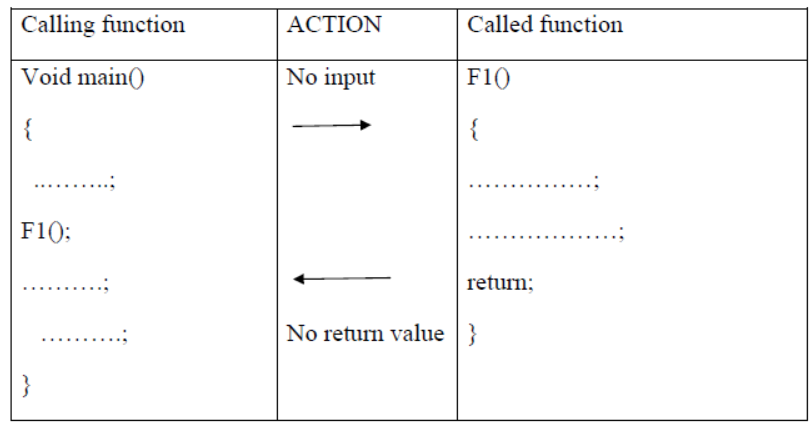
Ex:
void main()
{
void msg();
msg();
}
msg()
{
printf(“hello world\n”);
}
Question. functions with input and no return value- In this category of functions, the called function receives one or more input values, but does not send any output(return value) to the calling function
Answer.
Syntax:
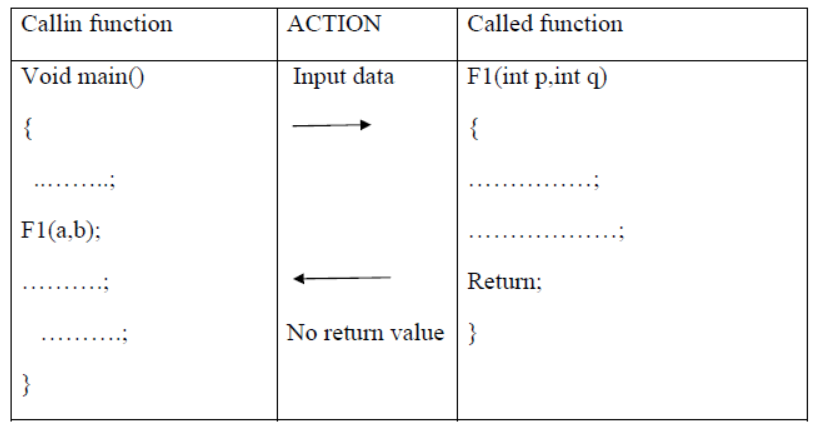
Ex:
void main()
{
void sum(int,int);
int a,b;
scanf((“%d%d”,&a,&b);
sum(a,b);
}
Void sum(int p, int q)
{
int r;
r=a+b;
printf(“sum of two numbers=%d\n”,r);
return;
}
Question. functions with input and return value- In this category of functions ,the called function receives one or more inputs and sends a return value to the calling function
Answer.
Syntax:
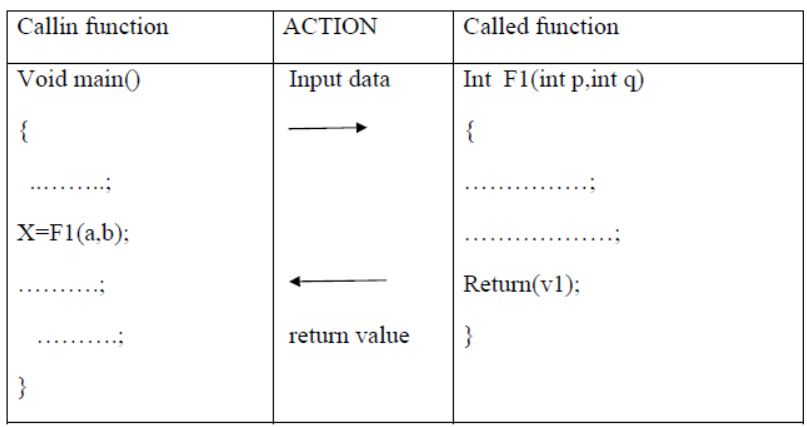
Ex:
void main()
{
int sum(int,int);
int a,b,X;
scanf((“%d%d”,&a,&b);
X=Sum(a,b);
printf(“sum of two numbers=%d\n”,X);
}
int sum(int p, int q)
{
r=a+b;
return(r);
}
Question. Recursive functions- recursion is the process of a function calling itself until a condition is satisfied.
Answer.
Syntax:
F1()
{
…………;
…………;
…………;
Return(F1);
}
Example:
void main()
{
int fact(int);
int n;
scanf(“%d”,&n);
printf(“factorial=%d\n”,fact(n));
getch();
}
int fact(int m)
{
if(m==0)
return(1);
else
return(m*fact(m-1));
}
Question. Define the following
a) Actual parameters
b) formal parameters
c) global variables
d) local variables
Answer.
Actual parameters
When a function is called from main program(calling function), the function call contains a list of data(variables) that are sent as input to the called function. Such data are called as actual parameters or actual arguments.
Ex:
X=test(p,q,r);
p,q,r are actual arguments
Formal parameters
The function header of a called function contains a list of data along with their data types. This list of data are known as formal parameters. The formal parameters
receive their value from actual parameters.
- The formal parameter values are available only as long as the function is being executed.
- For every actual argument there must be a formal argument of the same data type.
- Any changes made to the formal parameters in the called function do not change the actual parametersOnce the function is terminated the formalparameters are not available any more.
Ex: Int prod(int m, int n) function header
Local variables
Local variables are the data declared within a user defined function and available only within that function.
Ex:
int sum(int a, int b)
{
int r;
…………
………..
}
Global variables
Global variables are the data that are declared before the main program and that are available to the main program as well as the functions that are called from the main program.
int p,r;
void main()
{
}
Question. What are storage classes? Mention different types of storage classes. Explain
Answer. A storage class refers to the scope of data in a program. Scope of data means the portion of the program in which the variable is valid(mian() as well as sub programs) and lifetime of the variable.i.e., the length of time to which the variable retains its value.
A variable must belong to any one of the following storage classes.
1. Automatic storage class
2. External storage class
3. Register storage class
4. Static storage class
Automatic storage class
Automatic storage class is similar to local variable declaration
Key word auto precedes the declaration
Ex:
auto int x,y,z;
- Automatic variables are local variables
- The variables are stored in memory(RAM)
- The key word auto is implicit(it means even without the word auto the variable is automatic)
- Initial value stored is junk
External storage class
External storage class is similar to global variables.
Keyword extern precedes the declaration
Ex:
Extern int m,n;
- Scope of the variable is global
- The variables are stored in memory
- Needs explicit(must use the keyword)declaration
- Initial value stored is junk
Register storage class
Register storage class is used when data is needed in cpu registers
Key word register must precede the declaration
Ex:
register int x,y;
- Scope of the variable is local
- The variables are stored in registers
- Needs explicit declaration
- Initial value is not known
Static storage class
Static storage class is used in function blocks. The static variable can be initialized exactly once when the function is called for the first time. For subsequent calls to the same function, the static variable stores the most recent value. Key word static precedes the variable declaration
Ex: static int x,y,z;
- Scope of the variable is local
- The variables are stored in memory
- Needs explicit declaration
- Default Initial value is stored is 0.
POINTERS
One Mark Question and Answer
Question. What is a pointer?
Answer. A pointer is a dynamic variable that stores address of a data value in a program.
Question. How is a pointer declared in a c program?
Answer. syntax: datatype * pointer name;
Ex: int *p1,x=230;
Question. Name the operators used in pointers?
Answer. * and & operators
Question. How is a pointer initialized . give an ex.
Answer.Initializing a pointer means storing the address of the data variable in to a pointer.
Ex: p1=&x;
Question. What is meant by a pointer to an array?
Answer.A pointer to an array stores address of the 1st data element of the array.
Ex: int *p1,a[4];
P1=a; or p1=&a[0];
Question. If ptr is a pointer to an integer what is the meaning of an expression ptr++; ?
Answer. ptr++; will increment the pointer and will make the pointer store address of next data element in the array.
Question. What is meant by an array of pointers?
Answer. An array of pointer means a pointer array where every individual data is a pointer variable that holds an address.
Ex: int*p1[10],a[10],b[10],c[10];
P1[0]=&a[0];
P1[1]=&b[0];
P1[2]=&c[0];
Question. Is it possible to add two pointers?
Answer. no.
Two Mark Question and Answer
Question. With an example discuss the operators used with pointers.
Answer.
- * indirection operator. This operator is used to declare a pointer.
- &- address operator. This operator is used to locate the address of a pointer.
EX: int x=245,*ptr;
Ptr=&X;
- Ptr- stores address of X
- X-value stored=245
- &X-address of X
- *ptr- contents of location whose address is stored in ptr(245)
Question. Which operations are not possible with pointers?
Answer. It is not possible to perform arithmetic operations such as addition(+), subtraction(-),multiplication(*), division(/) with pointers.
Five Mark Question and Answer
Question. Explain call by value and call by reference with example.
Answer.
call by value- when a function call is given, a relationship is established between actual and formal parameters. A temporary storage is created for formal parameters to store the data(actual parameters) received as input from calling function. This process of data transfer from actual parameter to formal parameters is known as call by value.
Ex: void main()
{ int a=20,b=30,x;
Int f1(int,int);
-----
X=f1(a,b);
-----
Getch( );
}
Int f1(intp, intq)
{
p=p+p;
q=q+q;
return(p+q);
}
Call by reference- when a function is called, the address of variables are passed on to the called function. The parameters receiving the address should be pointer variables. This concept of sending the address of data from calling function to pointer variables in the called function is known as call by reference
Ex: viod main()
{
int a=10,b=15,c=20;
------
X=f1(&a,&b,&c);
------
getch();
}
int f1(int*p1, int *p2, int *p3)
{
*p1=*p1+10;
*p2=*p2+5;
}
STRUCTURES AND UNIONS
One Mark Question and Answer
Question. What is a structure?
Answer. A structure is a group of data of different data types.
Question. What is meant by structure template?
Answer. A structure template contains definition of a structure name and a list of members along with datatypes.
Question. What is meant by structure declaration?
Answer. Declaration of a structure means memory storage is allotted to every structure variable.
Question.Which operator is used to access the structure elements?
Answer. dot (.) operator
Question. Write the syntax for structure definition
Answer.
syntax:
struct structurename
{
Datatype member1;
Datatype member2;
…………………….
};
Question. Write the syntax for structure declaration.
Answer.syntax: struct structurename v1,v2,v3…..;
Question. Which is the reserved word which is used in structure definition ?
Answer. struct
Question.What are unions?
Answer. A union is a group of data of different data types all of which share a common storage location.
Question. Write the syntax for union definition declaration.
Answer. syntax: union unionname
{
Datatype member1;
Datatype member2;
……………………;
};
Question. Write the syntax for union declaration.
Answer. =: syntax: union union name v1,v2,v3,……;
Two Mark Question and Answer
Question. How structures are initialized? give ex.
Answer. A structure can be initialized at design time as follows
Ex: struct student
{
Int reg no;
Int age;
char name[20];
};
Struct student s1={223,17,”sinduma”};
Question. What are nested structures?
Answer. A structure built within another structure is called as nested structure.
Ex: struct dob
{
Int day;
Int month;
Int year;
};
Struct student
{
Int reg no;
Char name[20];
Struct dob date;
}s1;
Question. What is meant by an array of structures?
Answer. An array of structures contains data elements of every structure variable stored in to an array.
Ex: struct student
{
Int reg no;
Int age;
Char name[20];
}s[15];
Five Mark Question and Answer
Question. Write the differences between structures and arrays.
Answer.
| Structures | Arrays |
| Definition and declaration of program in structures are different. | Definition and declaration of program in arrays are the same. |
| a structures is a group of data of different data types. | An array is a group of data of same data types. |
| Nested structures are also accessed in structures. | No nested arrays are used in arrays. |
| Structure members are accessed by using dot (.) operator. | Index is used to access data in arrays. |
| In structures, we use a reserved word like struct. | In arrays, we do not use any reserved word. |
Question. Explain structures with an example
Answer. A structure is a group of data of different data types. A structure must be defined before it is declared. A structure template is created during structure definition. Once the definition is given, structure may be declared. Memory is allotted to a structure only after declaration.
Syntax for structure definition:
struct structurename
{
Datatype member1;
Datatype member2;
…………………….
};
Example for structure definition:
Struct student
{ int regno;
Char name[20];
Int age;
};
Syntax for structure declaration:
Struct <structurename> v1,v2,v3,……..;
Ex: struct student s1,s2,s2;
To access the members of a structure .(dot) operator is used
Ex:
Scanf(“%d%s%d”,&s1.regno,s1.name,s1.age);
FILES
One Mark Question and Answer
Question. What is a file?
Answer. A file is a collection of data that is available in permanent storage.
Question. Write the syntax for file declaration.
Answer. syntax: FILE *filepointer;
Ex: FILE *fp;
Question. What are modes in file?
Answer. Mode tells about the types operations like read,write or append that can be performed on a file that is being opened.
Question. Write the syntax to open a file.
Answer.syntax: filepointer=fopen(FILENAME,MODE);
Ex: fp=fopen(“in.dat”,r);
Question. What is the significance of fclose() function?
Answer. This function closes a file that has been opened for an operation. Syntax:
fclose(filepointer);
Ex: fclose(fp);
Five Mark Question and Answer
Question. Explain the different modes in which a file can be opened.
(write any 5 when the question is asked for 5 marks)
Answer.
Mode
1) r
Action : opens a file for reading
2) w
Action : opens/creates a new file for writing
3) a
Action : opens a file for appending data or creates a new file
4) r+
Action : opens a file for read and write
5) w+
Action : creates a new file for read or write
6) a+
Action : opens a file for read or write or creates a new file
7) rb
Action : opens a file for reading in binary
8) wb
Action : creates a new file for writing in binary
9) ab
Action : Opens a binary file for read, write or creates a new file.
10) rt
Action : opens a text file for reading
11) wt
Action : opens a text file for writing
12) at
Action : Opens a text file for read, write or creates a text file.
Question. Explain the following functions in a c program fscanf(), fprintf(), fgets(), fputs(),fread(),fwrite(), feof()
Answer.
fscanf()- This function is used to read data from a file.
Syntax: fscanf(filepointer,”format specifier”,&v1,&v2,….);
Ex: fscanf(fp,”%d%d%d”,&a,&b,&c);
fprintf()- this function is used to write data in to a file.
Syntax: fprintf(fileprinter,”format specifier”,v1,v2,…);
Ex:fprintf(fp,”%d\t%d\t%d\t”,a,b,c);
fgets()- this function reads s strinf from a file.
Syntax: fgets(string variable,size,filepointer);
Ex: fgets(str,40,fp);
fputs()- this function is used to write a string in to a file.
Syntax: fputs(string variable,size,filepointer);
Ex: fputs(str,40,fp);
fread()- this function is used to read data into a structure from a file.
Syntax: fread(&structure varable,size of(struct structurevariable),1,filepointer);
Ex: fread(&s,size of(struct s),1,fp);
fwrite()-This function writes a structure in to a file.
Syntax:
fwrite(&structure variable,sizeof(struct structure variable),1,filepointer);
Ex:fwrite(&s,sizeof(struct s),1,fp);
feof()- this function returns a value true or false. When a file is being read, if there is no more data in the file, then feof() function returns a value true. When a file is being read, if there is more data in the file then the function returns a value false.
INFORMATION SYSTEMS AND DATABASE OPERATIONS
Question. What is Data?
Answer. Data is the basic element in any computer processing. Data is a raw (unprocessed) fact or collection of facts and figures or an observation. It may be number, an alphabet, or a sequence of characters.
For example 25, A, Sanjana etc.
Question. What is Information?
Answer. Information is a processed data and has an implicit meaning. Information is a structured data. It is useful for decision making.
Question. Explain types of Information.
1. Strategic information
2. Tactical information
3. Operational information
4. Statutory information
Answer.
Strategic Information:
- It is needed for long-term business goals and objectives.
- This directs the prospects of the business.
- Organizations aim for expanding their business, increasing the sales and profits, enhancing their customer base, building their band, and grabbing the market capital.
- The marketing team observes the trends of the business and collects the sampling data and arrives
- at strategic information.
2. Tactical Information:
- This type of information is needed for short term business goals and objectives.
- This information helps managers to make valid decisions to run the business efficiently and effectively.
- In a small business organization, information on fast moving goods may be used to make tactical decisions. Tactical information is obtained from the day-to-day transactions.
3. Operational information:
- It is required for daily business operations. Such as list of items which is out of stock. This information can be used to trigger the purchase department to purchase those items and fill in the inventory
Eg : The information like list of customers who have not paid even after the due date would be used to send the remainders. - Operational information is obtained from the data processing group in the organization.
4. Statutory information:
- This information is provided by the Government as the regulation to be followed by the organizations.
- Organizations must communicate to the government authorities about the results of their revenue, profit and stock holder benefits such as dividend and bonus.
- The data processing system would provide the required information.
Question. What is data processing?
Answer.
- It can be defined as the process of collecting, storing, organizing and manipulating a huge amount of data in a specific transaction.
- The result of data processing is structured information that enables the managers to make valid decisions.
- It helps the organizations in managing the resources effectively and efficiently.
Question. What is data Processing System?
Answer. A system which includes the resources such as people, procedure and devices that are used to accomplish the processing of data for producing desirable output
Question. Explain Data Processing Stages /cycle:
Answer.
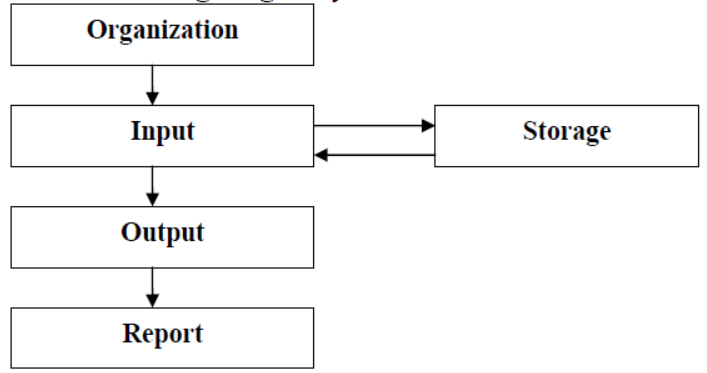
Different Stages of data processing cycle
It has 3 important stages in producing useful information.
They are
1. Input
2. Processing
3. Output
Input:
- This is the first stage in data processing. It indicates the facts or observations collected, prepared and entered into the computer.
- Once such data is fed into the computer, it performs certain operations as desired and produces the results.
Three steps involved in input stage of data processing.
1. Data collection
2. Data preparation
3. Data entry
Data Collection:
- Is a process of collecting and gathering of data from different sources.
- A survey conducted to gather some important data or observations.
Data Preparation:
- Is a process of creating the documents for further processing. In this step, the data collected is put into a data sheet.
Data entry:
- Is a process of entering data into the computer for data processing. The data may be entered into the computer through various input devices such as keyboard, optical scanners or magnetic character recognizers.
- Eg: To generate marks report of the student, collect roll-no, name, each subject marks
Processing:
The data entered has to be processed. This process involves the following five steps.
1. Storage
2. Retrieval
3. Categorization
4. Organization
5. Updation
1. Storage: is a computer memory where data is stored permanently for future processing. The data may be stored on a magnetic tape, hard disk or optical disks.
2. Retrieval: is a process of getting the desired data from storage. There are a set of commands which will help accessing memory and fetching data for processing.
3. Categorization: is a method, which classifies data into most recent and least recent data. The data can be old or new.
4. Organization: is a process of arranging data in a specific manner. Data can be arranged in an ascending order or in a descending order. This process is also called sorting.
5. Updation: is a process of adding new data or deleting unwanted records.
For example
i) When a new batch of students get admitted to the course, data pertaining to this batch is added to the student information system and when someone discontinues the course, his/her records are deleted from the system.
ii) To generate marks report, to calculate total, average, grade etc.
Output:
This is the process of getting the results printed on paper. (Printout)
The printout can be obtained in the following 2 steps.
1. Report generation
2. Inquiry generation
Report generation:
Is a process of providing the hard copy output.
For eg: after the examination, the results can be printed on paper.
Inquiry response:
is a process of providing an individual report on inquiry.
For eg: Inquiry about those students who have got distinction, first class, second class and so on.
Files and File organization:
Files are the backbone of any data processing and database management system. They are used to store business data and records.
Data file: is a collection of logically related records.
Record: is a collection of related data fields.
Field: is a piece of information or data item.
Eg: name, age etc.
Question. What is database?
Answer. A database is a collection of logically related data
Question. What are the File Operations?
Answer. The following are the types of file operations required to process records stored in the files.
1. File creation
2. Location a record
3. Adding a record
4. Deleting a record
5. Modifying a record
Types of Files:
- Master file
- Transaction file
Question. Write the difference between Master file and Transaction File
Answer.
| Master File | Transaction File |
| The data stored in these files are permanent by nature | The data stored in these files are temporary by nature |
| This file is empty while nature | This file contains data only for period of time and send to the master file |
| This files are updated only through recent transactions | Any data to be modified is done in this file |
| This file stores large amount of data Eg: customer ledgers, student database | In this file the data to be modified is stored . Eg: price of the products, customers order for the products, inserting new data to the database etc. |
FILE ORGANIZATION:
It refers to the way of arranging the records in a file which can be accessed in a faster way.
The criteria considered in choosing a file organization are:
1) Fast access to single record or collection of related records.
2) Easy record adding/ update/ removal without disrupting.
3) Storage efficiency
4) Redundancy as a warranty against data corruption.
The files are generally viewed as
Logical File organization: The groups of fields which are combined to form logical record, which can perform different operations on the file.
Physical file organization: The data which is stored in the form of records can be placed in any storage devices, main memory, secondary memory etc.
Question. Explain types of File Organization:
Answer.
1) Sequential Access File Organization
2) Direct Access File Organization
3) Index Sequential Access File Organization
Sequential Access File Organization:
1) All records are stored in a sequential order.
2) That is, the records are arranged in the ascending or descending order of a key field.
3) Eg: a) In a student information system, the file would contain roll number, name, division, marks obtained in the examination.
b) In a payroll application, the records are stored with employee number as a key field.
4) To locate a particular record in such file organization, we have to start searching from the beginning of the file until it is found in the file.
5) It is time consuming process.
6) Normally created and maintained on magnetic tapes. Eg: Audio Cassettes.
7) There is no need for any storage space identification
Advantages:
1) Simple to understand
2) Easier to organize, maintain
3) Economical
4) Error in files remain localized
Disadvantages:
1) Entire file has to be processed
2) Transactions must be sorted in a particular sequence before processing
3) Time consuming searching
4) High data redundancy
5) Random enquiries are not possible to handle
Direct Access File Organization (Random Access or relative file organization).:
1) Also known as Random Access or relative file organization.
2) Records are stored in Direct Access Storage Device(DASD). Such as magnetic disk(Hard disks).
3) For direct access, the file is viewed as numbered sequence of blocks or records.
4) These blocks or records are taken as key for accessing the desired information randomly.
5) It allows arbitrary (random) blocks to be read or written.
6) It is useful for immediate access to large amount of information. They are often used in accessing large databases.
7) This technique is called as hashing
Advantages:
1) Immediate Access of the desired records.
2) No sorting of the records is required.
3) Faster updating of several files.
4) Helps in online transaction processing system like online reservation systems.
Disadvantages:
1) Data may be accidentally erased or over-written unless special precautions are taken
2) Backup facility is needed
3) Expensive- hard disks are needed to store the records, it is expensive
4) Less efficient as compared to sequential file organization in the use of storage space
5) Only one key is used
6) Cannot be accessed sequentially
Index Sequential access file organization(ISAM)
1) This file organization is a synthesis of the above two file organizations.
2) It combines the positive features of both the sequential and direct access file organizations.
3) Here records are stored randomly on a direct access device such as magnetic disk by a primary key.
Hence, we can access data either sequentially or randomly using the index. The index is stored in a file and read into memory when the file is opened.
4) It may have multiple keys. These keys can be alphanumeric
5) The key upon which the data records are ordered is called the primary key.
6) Other keys are called alternate keys
Advantages:
1) Multilpe keys – are also alphanumeric in nature
2) Both sequential and random access is possible
3) Accessing of records is fast, if the index table is properly organized
Disadvantages:
1) More storage space is needed because of the presence of Index
2) Less efficient in the use of storage space as compared to other file organizations
3) It requires special software, i.e expensive.
C Programming Printable Worksheets and Exercises for Computer Science
Mastering C Programming with Printable Worksheets
Review targeted practice exercises for Computer Science C Programming . Curated to match official Computer Science guidelines, these printable problem sets support daily revision and improve overall test readiness.
Verified Solutions and NCERT Alignment
Each worksheet draws directly from authorized standard textbooks to maintain academic accuracy. Evaluating your finished exercises against expert-verified solutions helps master the formal presentation standards expected in school evaluations.
Additional Study Resources for Computer Science
Wrap up your chapter revision by testing your knowledge against standard objective question formats. Explore our full library of free, up-to-date printable assignments to maximize your academic results in upcoming Computer Science evaluations.
FAQs
You can download the latest chapter-wise printable worksheets for Computer Science C Programming for free from StudiesToday.com. These have been made as per the latest Computer Science curriculum for this academic year.
Yes, Computer Science worksheets for C Programming focus on activity-based learning and also competency-style questions. This helps students to apply theoretical knowledge to practical scenarios.
Yes, we have provided solved worksheets for Computer Science C Programming to help students verify their answers instantly.
Yes, our Computer Science test sheets are mobile-friendly PDFs and can be printed by teachers for classroom.
For C Programming , regular practice with our worksheets will improve question-handling speed and help students understand all technical terms and diagrams.