

Download Computer Science Practice Worksheets
Access comprehensive chapter-wise worksheets for Fundamentals of Network Operating System using the Fundamentals of Network Operating System Computer Science Exercise. Designed to align with the 2026-27 academic syllabus for Computer Science, these printable practice sets help students reinforce key concepts and improve their overall exam readiness.
Access Fundamentals of Network Operating System Practice Papers and Solutions
Navigate directly to the solved Computer Science worksheets using the digital viewer below. Each practice set includes detailed step-by-step solutions, allowing students to instantly cross-check their work and identify areas requiring further revision.
One Mark Question and Answer
Question. What is a computer network?
Answer. It can be defined as interconnection of autonomous computers and terminals together using communication systems to facilitate exchange of information.
Question. Mention the advantage of networking.
Answer. speed, cost, etc
Question. Mention the different types of network.
Answer. Local area network(LAN),
Wide area network(WAN),
Metropolitan area network(MAN)
Question. What is a file server?
Answer. It is the main component of the network. It is a very fast computer with a large amount of RAM and storage space. File server stores all the files and application software and operating system.
Question. What is a work station?
Answer. It is also referred to as nodes, clients are the computers connected to the file server.
Question. Mention the most widely used interface card.
Answer. Ethernet cards
Question. What are routers?
Answer. a router translates information from one network to another. Routers select the best path to route a message based on the destination address and origin.
Question. What are switches?
Answer. it is a device that provides a central connection point to cables from server’s workstations and peripherals.
Question. What are the functions of the bridges in the network?
Answer. It provides link between the older network and the new network.
Question. Mention different network services.
Answer. file service,
Print and fax services,
Message services,
Application services,
Database services
Question. Mention different data transmission methods.
Answer. Serial transmission method and parallel transmission method
Question. Mention the different communication modes.
Answer. 1) simplex 2) half-duplex 3) full-duplex
Question. Mention the different switching techniques.
Answer. 1) circuit switching 2) message switching 3) packet switching
Question. What is topology?
Answer. it can be defined as physical layout of the cables, arrangement of resources and communication facilities.
Question. Mention the different types of topology.
Answer. bus, star, ring, tree, mesh
Question. Mention major network architecture.
Answer.
1) client-server network
2) Peer-to-peer network
Question. What is client-server technology?
Answer. It is a network where one computer acts as the server and another is called client. The server is the most important part of the network system providing access to resources and providing security.
Question. Mention the advantage of client-server technology.
Answer.
1) resources and security are directly controlled through the server.
2) New technology can be easily implemented in to the system.
Question. Mention the disadvantage of client-server technology.
Answer.
1) investment on the server and networking cost is high.
2) Network administrator is required.
Question. What is peer-to-peer technology?
Answer. In this architecture all computers are considered equal because all have the same abilities to use the resources available on the network. Here the resources are shared among the nodes. Each computer acts both as client and server.
Five Mark Question and Answer
Question. Explain advantages of Computer Network
Answer.
- Speed: The files can be transferred from one Computer to another instantly.
- Cost: Application software(Network version) can be installed on one Computer and accessed by other Computers on the Network. This makes maintenance and upgrading of software easy.
- Security: The information on the computer can bemade available only through password.Further some information can be made available only for reading and not copying.
- Resource sharing: Expensive peripheral devices can be shared by many users in a network.
- Easy access: Users can access information from any computer that is available on the network. They need go to a specific Computer which may be located in a different building or different location to retrieve information from their account.
Question. Explain different types of Computer networks
Answer. The different types of Computer networks are
- LAN-Local area Network is networking of Computers ia a network in a smaller physical area like a home,office or small group of buildings. The advantage of LAN is high data transfer rate, sharing of resources like printers,files and other applications. The Computers are connected using cables.
- MAN-A Metropolitan are Network is a network of computers within a city or metropolitan area. It is an extended LAN. They use fibre optic cables for faster data transmission. A MAN supports both data and voice. Cable televisions are examples for MAN.
- Wide area Network-Wide area Networks connect computers in larger geographical areas . The computers are connected using satellite links, under sea cables or long
- distance telecommunication links. Security of data is high.It supports remote accessing.
Internet services are typical example of WAN
Question. Explain Network services
Answer.
- File Services-All the data files of an organisation are stored in one place and can be shared by many users. Files can be organised and updated systematically.
- Print Services- When Printers available on the Network , multiple users can print to the same printer. The network printers are usually faster and more capable. They may have accessories such as envelope readers or multiple paper trays
- Database Services-Multiple users can have access to the database at the same time.
- The Database software ensures integrity of data and provides multiple access.
- Message Services-The services include Electronic mail, voice mail, remote access,document transfers across the internet.
- Application services- several software applications that are developed using network architecture. The applications can be made available to multiple users. Any upgradation made to these applications is also instantly available to the users.
Question. Mention different types of Network topologies. Explain
Answer.
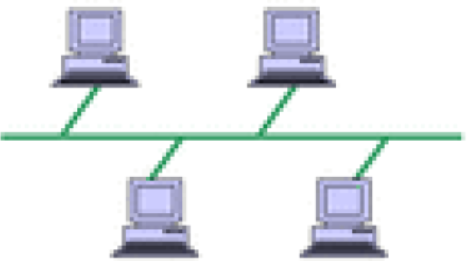
BUS- the linear bus topology connects all the nodes to a common straight cable. All the nodes on the network share the common bus. This topology is very reliable since a failure of one or more nodes does not affect the bus. The disadvantages of the linear bus are the need for minimum distances between nodes to avoid signal interference, and the loss of data caused by the simultaneous transmission by two nodes.
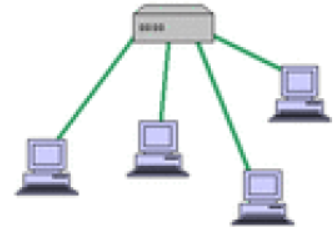
STAR- in star network, each node is connected directly to the central computer. All communications between the nodes have to pass through the central computer. Star networks allow the administrator to give selected nodes higher priority and also allow centralized running of diagnostic programs.
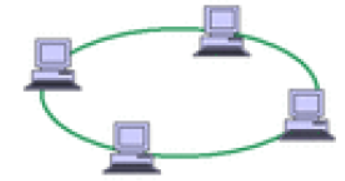
RING- in a ring network, all nodes are connected to a common cable, and the cable starts and ends at the network server. In this type of network, communications are always in one direction, and the data being transmitted is passed through each node in the ring. A major disadvantage of this network is that when a node fails, it can completely halt all communications on the network.
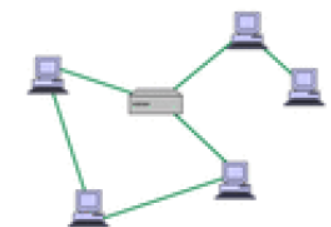
TREE- a tree topology combines characteristics of linear bus and star topologies. It consists of groups of star configured workstations connected to a linear bus backbone cable. Tree topologies allow for the expansion of an existing network, and enable schools to configure a network to meet their needs.
MESH- a pure mesh network has point- to- point connections between every node in the network. Pure mesh architectures are not usually considered practical. One problem is that each device requires an interface for every other device on the network.
Question. Write short notes on Client-Server networking
Answer. Client - server networks consist of servers and clients. Server is a powerful Computer using advanced network operating system and clients(works tation) access data stored in servers. Server can host e-mail, store common data files and other applications needed by the client. The server also validates any user who tries to login and denies access to network resources as well as client software to unauthorised users. Servers are mainly used for centralised management of data and resources.
Advantages
- Data security and resources are controlled through server.
- Upgrading and replacement of applications are done as needs increase, without changing the existing formats.
- Clients can access the server from remote locations.
- Reduces cost of client’s computer
- New technologies(object oriented programming)can be integrated easily ,as and when the need arises.
Limitations(Disadvantages)
- Initial investment may be expensive
- Maintenance will require staff who must ensure efficient operations
- If the server breaks down , the operations of client processes may stop.
Question. Explain peer-peer networking
Answer. In a peer-peer network ,there are no dedicated servers. All Computers are equal, and therefore termed as peer-peer. Each Computer functions both as a client and a server. No single Computer holds the control of entire network. The users are located in the same area and security is not an important issue. All the users can access data and programs that reside on all the computers across the network without any restrictions.
Advantages
- There is no need for dedicated server. Therefore less expensive.
- A single user operating system such as windows-XP is sufficient
Disadvantages(Limitations)
- There can be no security as all computers can be accessed by all users
- A failure of a node in peer-peer network means the network can no longer access data or applications on that node.
- The number of Computers connected are limited to 10 or 12
Question. Explain features of Windows operating system
Answer.
- Windows operating system is GUI (graphical user interface)based
- Built in support for multiple users on a single PC
- Plug and play support for hardware
- User friendly interface
- Uses device driver software for easier installation of new hardware and software
Note : to write the features of windows NT(Network operating system) same features can be high lighted. In addition to this the following points may be added.
• Supports client-server applications
• Management of networks
Question. Write functional overview of unix
Answer.
- More than one user can use the machine at the same time through different terminals
- More than one progrm can run at a time(multiprogramming)
- Multiple tasks can be carried out at the same time like printing, compiling(multitasking)
- Portability of programs from one computer to another
- Wide range of support tools are available such as debugging tools,compilers and other software.
- Hierarchial directory structure for maintenance of directories and files
Question. Discuss functional overview of Linux
Answer. Linux operating system is same as unix. But linux is graphical user interface based system. The functions of linux are
- More than one user can use the machine at the same time through different terminals
- More than one progrm can run at a time(multiprogramming)
- Multiple tasks can be carried out at the same time like printing, compiling(multitasking)
- Portability of programs from one computer to another
- Wide range of support tools are available such as debugging tools,compilers and other software
Download Computer Science Fundamentals of Network Operating System Practice Worksheets
Daily Practice Questions for Computer Science
Review targeted practice exercises for Computer Science Fundamentals of Network Operating System. Curated to match official Computer Science guidelines, these printable problem sets support daily revision and improve overall test readiness.
Detailed Answers for Computer Science Fundamentals of Network Operating System
Built using official NCERT guidelines for Computer Science, these practice sheets provide reliable academic support. Cross-reference your completed work with our detailed solutions to learn standard answer-writing formats for Computer Science exams.
Complete Your Chapter Revision
Wrap up your chapter revision by testing your knowledge against standard objective question formats. Explore our full library of free, up-to-date printable assignments to maximize your academic results in upcoming Computer Science evaluations.
FAQs
You can download the latest chapter-wise printable worksheets for Computer Science Fundamentals of Network Operating System for free from StudiesToday.com. These have been made as per the latest Computer Science curriculum for this academic year.
Yes, Computer Science worksheets for Fundamentals of Network Operating System focus on activity-based learning and also competency-style questions. This helps students to apply theoretical knowledge to practical scenarios.
Yes, we have provided solved worksheets for Computer Science Fundamentals of Network Operating System to help students verify their answers instantly.
Yes, our Computer Science test sheets are mobile-friendly PDFs and can be printed by teachers for classroom.
For Fundamentals of Network Operating System, regular practice with our worksheets will improve question-handling speed and help students understand all technical terms and diagrams.